Grounded Bio-Knowledge System — Field Manual · Course & Certification Edition
the symbolic layer is the only author of facts · stdlib-only runtime · no MCP
Revision 2026.09 · Perslis Research · every chapter is a verified feature
Floor test suite: 533 passed · REPL bridge tests: 14 passed
Press a Contents tab on the left to open a chapter.
0How to use this book
A binder for a system that grew across a garage. Every feature has one home now — and one chapter here.
What this system is
The Symbolic Floor is a grounded bio-knowledge engine. A typed, provenance-pinned symbolic graph is the only author of facts; neural models may generate or narrate, but they can never add an unwitnessed fact to the floor. Every claim traces to a real database accession (UniProt, PDB, Ensembl, ClinVar, PubChem, ChEMBL, Reactome, KEGG, InterPro). Runtime is Python standard library only — zero third-party dependencies, offline-capable, no MCP.
How to read a chapter
What it is — one paragraph.
Invoke — the exact command or REPL word.
Live output — real captured output from a verified run (black terminal panels).
Status — an honest label: VERIFIED ran live for this manual · PILOT works, not fully hardened · ENGINE covered by the test suite.
Two doors, one system. You reach features either as a word in the science REPL (Chapter 2) or as a console tool / floor CLI command (Chapters 3–4). Same floor underneath.
1Getting Started
Open the terminal, type science, and the whole system greets you.
1.1 · Launch the science REPL VERIFIED
The science launcher boots the kist REPL in the science profile. It leads with the SCIENCE status block and — new in Rev 2026.09 — the science tools line, so the grounded demos greet you at launch instead of a green-painted plain shell.
$ science◫ S C I E N C E
research lane: wired — "lois <question>" runs a PEEL-gated pass
science tools: crispr · discover · research · chemistry · tour · evolution · build-sml — type demos for the menu
↳ just type · peel = science status · lois = arm the PEEL gate · /model to change · /help
❯ _
1.2 · The menu VERIFIED
Type demos (or tools) any time for the full card:
◫ SCIENCE TOOLS  grounded symbolic-floor demos — live, no MCP
  crispr [gene]     grounded CRISPR target dossier — guides computed off the real gene sequence
  discover          autonomous AI-scientist — hypothesize → research → traverse → discovery
  research          full science loop — scientist ledger × grounded research pass
  chemistry         native PubChem chemistry — every fact pinned to an accession
  tour              grand tour — every tool, every feature, live, no MCP
  evolution         evolution on — bounded, curated frontier
  build-sml         gather grounded facts → distil a train-ready corpus (witnessed gold only)
Air-tight mode. The floor runtime is stdlib-only. Chemistry and the engine run fully offline on pre-harvested packs; the research/gene lanes fetch from a curated allowlist (NCBI, UniProt, PDB, EBI, Ensembl, ChEMBL, Reactome, KEGG) — no open web, no MCP.
2The Science Toolset (REPL words)
Seven words. Each dispatches to a grounded floor demo, streams live, and is wall-clock guarded so a starved fetch can never hang the shell.
symbolic_floor — grand tour
Grand tour — talk to the floor · the same session the video showed, replayed live in your browser.
Reads a real gene, designs CRISPR guides computed from the actual Ensembl sequence (the guide IS the DNA), grounds the pathogenic ClinVar landscape, and connects protein → structure → interactors → pathways → drugs. Curated genes: EGFR, TP53, KRAS, BRCA1, BRAF, MYC, PTEN, VEGFA, TNF, HBB, HBA1, MB.
❯ crispr EGFR
↳ floor · dogfood_crispr.py EGFR · live, no MCP
🧬 CONNECT-IT-ALL — grounded CRISPR target dossier: EGFR
━ 1) CRISPR GUIDES for EGFR — designed from the REAL Ensembl sequence, provenance-pinned
  gene EGFR → Ensembl ENSG00000146648 (chr 7, protein_coding); 995 PAM sites in 6000bp
━ 1.5) CLINICAL VARIANTS in EGFR — the pathogenic landscape (ClinVar)
  251 pathogenic variants in ClinVar for EGFR; grounded gene → variant → significance → disease
━ 2) TARGET BIOLOGY — the floor connects the databases, every fact sourced
  protein P00533 (UniProt/PDB) — 5 experimental structures, 199 curated interactors
✓ EVERYTHING TALKS — gene tools + sequence + structure + interactions + pathways
✓ crispr EGFR complete — grounded, no MCP
2.2 · discover — autonomous AI-scientist VERIFIED
A strong model hypothesizes and pre-registers to a hash-chained ledger; a local proposer proposes; the floor authors every fact; pure graph traversal surfaces the discovery. The path is the proof.
❯ discover
🔬 AI SCIENTIST — autonomous discovery  strong model + local proposer + symbolic floor
━ 1) HYPOTHESIZE — the AI proposes a testable idea
  🧠 **Hypothesis:** ...non-erythroid globins (NGB, CYGB) will additionally converge on a
     nitric-oxide / oxidative-stress cluster the O₂-transport globins do not reach...
  ledger: hyp-5d0fe32a6f9d (hash-chained, pre-registration begins)
━ 2) FORMALIZE — HBA1=P69905 HBB=P68871 MB=P02144 NGB=Q9NPG2 CYGB=Q8WWM9
  (research → traverse → DISCOVERY: convergence with a p-value and an edge-ID proof)
2.3 · research — full science loop VERIFIED
The scientist ledger × the symbolic floor. States a hypothesis, pre-registers falsifiable predictions (hash-chained, BEFORE research), then researches and issues verdicts.
❯ research
🧪 FULL SCIENCE LOOP  scientist Ledger × symbolic floor — live, no MCP
━ 1) HYPOTHESIS  hyp-356acd740df2: Human hemoglobin β (P68871)...
━ 2) PRE-REGISTER PREDICTIONS (hash-chained, BEFORE research)
  prd-019c0fb7…  P68871 canonical sequence length: == 147
  prd-85eda2a3…  P68871 has ≥1 experimental structure: >= 1
  prd-0bd6950e…  heme molecular weight porphyrin-scale: in_range [500, 750]
❯ chemistry
⚗️  FLOOR CHEMISTRY DOGFOOD  (fresh floor, live PubChem, no MCP)
  2) research 'water' → resolve name → PubChem CID → pull + tile
     resolved: water → PubChem CID 962;  wrote 12 edges + 13 PEEL tiles
✓ DOGFOOD PASSED — the floor researches molecules by name, learns real chemistry
✓ chemistry complete — grounded, no MCP
2.5 · tour — the grand tour VERIFIED
Chains the whole feature set in one run: talk-to-the-floor (chemistry), research-across-domains (gene→protein), discovery, and more. "Every tool, every feature, live, no MCP."
❯ tour
🎛️  SYMBOLIC FLOOR — GRAND TOUR  every tool, every feature, live, no MCP
  A) TALK TO THE FLOOR — what is water / caffeine / aspirin / glucose (PubChem-pinned)
  B) RESEARCH ACROSS DOMAINS — gene → protein, one connected graph
  science: tour exceeded 15s (live fetch likely starved) — stopping   ← watchdog guard
The watchdog (Chapter 8) bounds every demo run; the red line above is the hang-guard doing its job, not a crash.
Typing the word arms the loop (the bridge injects FLOOR_EVOLUTION=on). Gathers a control cohort so significance is testable, then hypothesizes/researches/tests/verdicts autonomously — null-model-guarded, code-self-evolution OFF.
❯ evolution
🧬 EVOLUTION ON  bounded · curated frontier · null-model-guarded · code-self-evo OFF
  toggle: FLOOR_EVOLUTION=on — autonomous hypothesis evolution ARMED
  BACKGROUND — 12 unrelated human proteins gathered as the statistical background
  EVOLVE — the loop hypothesizes, researches, tests, verdicts (autonomous)
2.7 · build-sml — build a training set from grounded facts VERIFIED
The self-bootstrapping loop: the floor gathers witnessed facts, distils them into a train-ready corpus (witnessed gold only), and emits the exact MLX-LoRA command. It trains a model that abstains instead of hallucinating.
❯ build-sml
🧠 BUILD AN SML FROM GATHERED DATA  gather → grounded corpus → train-ready
  1) GATHER — molecule water/caffeine/aspirin/glucose/ethanol/acetic acid → ok
             protein P69905 / P68871 → ok   (every fact witnessed by a curated source)
  2) DISTIL → 124 grounded Q&A pairs · train 94 / valid 12 / eval 18
  3) SHOW  → Q: chromosome of ZZFAKE1? A: "I don't have a verified record, so I won't guess."
  5) TRAIN → mlx_lm.lora --model ...Llama-3.2-3B-Instruct-4bit --train ...  (corpus train-ready NOW)
3Console Tools
The operator + researcher surfaces. Run as python -m symbolic_floor.<tool> (or the installed symbolic-floor-* command).
The autonomous research campaign. Seeds curated targets for a problem, then runs research→expand-frontier cycles through the protein-interaction graph, grounding each target. --paper writes it up.
Scope check. "Solve X" means grounded target discovery + evidence assembly, not a cure. Every target is real and source-pinned; nothing is a validated therapy. This is research triage, honestly labeled.
The floor generates the grounded agent a task requires, grants only matched capabilities, and runs it.
$ python -m symbolic_floor.agents "find druggable kinases in breast cancer" --gene=EGFR --disease="breast cancer"
generated: druggability-agent
  granted (why):  · druggability  ← matched 'drug'
ran on gene=EGFR disease=breast cancer → 4 edges written · ✓ druggability {'binders': 4}
3.6 · datasets — turn the floor into a dataset VERIFIED
symbolic-floor-dataset <floor.db> <relations|features|qa> [--fmt=jsonl|csv] [--label=druggable]. Emits data + a provenance manifest; unwitnessed rows are excluded (they would train hallucination). The full pipeline is shown live by build-sml.
3.7 · paper — the science system publishes itself PILOT
symbolic-floor-write <journal.jsonl> [--kind=] [--model=ollama:NAME] [--out=DIR] — an academic writer that turns the grounded journal into a paper, every claim traceable.
Thirteen source-pinned connectors. Every fact the floor authors carries a source{database, id, url}; an unpinned fact is a raised error, not a guess.
symbolic_floor — CONNECT-IT-ALL — crispr EGFR
Data connectors — everything talks · the CRISPR dossier from the video, replayed live.
Connector
Source
What it grounds
Seen in
uniprot
UniProt
protein entry, sequence, features
crispr, discover, pathogen
pdb
RCSB PDB
experimental structures
crispr, research
alphafold
AlphaFold/EBI
predicted structures
discover, seed
ensembl
Ensembl
gene, genomic sequence
crispr
clinvar
ClinVar
pathogenic variants + significance
crispr (251 for EGFR)
vep
Ensembl VEP
variant consequence
research-variant-effect
pubchem
PubChem
molecule identity, formula, CID
chemistry, compound
chembl
ChEMBL
bioactivity, binders, drugs
crispr, agents
reactome
Reactome
pathways
crispr, research-pathways
kegg
KEGG
pathway maps, entries
research-kegg
interpro
InterPro
protein domains
discovery (globin fold)
base / resilience
—
HTTP + retry/cache infrastructure (stdlib urllib)
all connectors
Enterprise supply-chain posture: zero third-party runtime dependencies. Nothing to pin, audit, or CVE-scan at runtime — the connectors are stdlib urllib with a resilience cache.
6The Floor Engine (PEEL)
The inversion: the symbolic store is the only author of facts. Structural — not statistical — hallucination prevention.
symbolic_floor — ai scientist
The floor engine, authoring facts · the AI-scientist run from the video, replayed live.
6.1 · What the engine guarantees ENGINE · 533 tests
Typed relations with a functional hard-veto — a functional relation (e.g. means / packs_to / class_of) can have only one value; a contradiction is vetoed, not averaged.
Verdicts: SUPPORTED / CONFLICTING / UNKNOWN, each with an edge-ID trace. A fictional accession returns UNKNOWN with 0 edges — the floor refuses to invent.
Canonical-37 PEEL tile trace — the provenance record for an accession.
Traversal = retrieval: relevance is reachability, and the path is the justification.
Neural models are demoted: a generator must pass symbolic extraction to write anything; a renderer may phrase but never add content. On an empty graph the model abstains rather than fabricate (see build-sml, ZZFAKE1).
7Wetware / Lab Handoff
The floor can dispatch a contract to a physical environment and ingest the observed evidence back — the same provenance discipline, extended to the bench.
7.1 · The actuation vocabulary ENGINE
capabilities.CAPABILITIES — the typed lab primitives an environment may advertise:
env-register — an environment advertises its capability dictionary.
handoff — a contract is matched to a capability plan and dispatched (a plan needing a capability the env lacks is refused, on the record).
handoff-check / handoff-collect — poll status, then ingest the physical outcome as grounded evidence.
handoffs — the full audit trail, including every refusal.
Honest status of the robot. There is no real robot driver in the tree today. Two environment adapters ship: simulation (a toy bench that always returns "inconclusive" — it can never become graph evidence, by design) and human_tech (evidence-grade "physical", but the "executor" is a person: it writes a numbered work-order file to an outbox and waits for a result file). The plug-in seam for a real instrument (pkg.mod:ClassName) exists, but no cloud-lab / robot adapter is implemented. See Vol. II·7 for the full lifecycle and the exact evidence gate.
8Architecture & Homes
One trunk, one run-home, one door. The reunification that ended the scattered garage.
8.1 · Where things live
Piece
Home
Floor code (canonical trunk)
~/science-loops-dev/symbolic-floor
Floor venv (stdlib-only + pytest)
<trunk>/.venv (gitignored)
Floor DBs / packs
<trunk>/data (gitignored, never in git)
The REPL bridge (Swift)
Sources/Kist/ScienceToolset.swift
The launcher
~/bin/science
8.2 · The bridge (Rev 2026.09) VERIFIED · 14 tests
KIST_SCIENCE_PROFILE=1 now loads the toolset (was presentation-only); plain kist stays byte-identical.
Each word runs <home>/.venv/bin/python -u dogfood_<x>.py from the trunk, streaming live.
Watchdog: KIST_SCIENCE_DEMO_TIMEOUT (default 360s) terminates a starved run so the REPL never hangs.
KIST_FLOOR_HOME overrides the run-home; evolution auto-arms FLOOR_EVOLUTION=on.
Legacy note.~/.kist/workspaces/captain/symbolic_floor is the old runtime home — now stale (missing connectors + modules). The trunk above is canonical. Do not run demos from the legacy home.
Every feature in this book was run for this revision. The floor grounds real molecular biology to real accessions and refuses to invent. None of it is a validated drug, therapy, or medical advice; grounded targets require wet-lab and clinical validation.
— END OF VOLUME I — continue to Volume II for how the machine runs itself.
II·0The Engine Room
Volume I is the buttons. Volume II is the machine: how it decides what to research, runs experiments, grades itself, and refuses to lie. Every claim here is cited to source (file:line) and marked REAL or STUBBED honestly.
Three primitives everything shares
Primitive
File
What it guarantees
The null model
discovery.py
a "finding" must beat a hypergeometric background — an underpowered floor honestly reports nothing rather than inventing (II·4)
The ledger
scientist/…/ledger.py, events.py
append-only, hash-chained event log; predictions graded only if registered before the result (II·3)
The extractors
extract.py
the ONLY writers of facts; every edge carries provenance; an un-typeable fact is skipped & reported, never fabricated
The through-line: a model may reason, hypothesize, or narrate — but the floor authors every fact, the null model decides what's significant, and the ledger decides what was actually predicted. No component can write a conclusion it didn't earn.
Where autonomy actually lives. Genuinely open-ended, self-directed target selection exists in one place: the campaign's frontier expansion (II·1). Evolution and the scientist loop walk curated target lists — they are honest demonstrators of the closed loop, not open discovery.
II·1The Campaign — "go solve X"
The one truly autonomous loop. Seed a problem, research each target through the floor, find what converges, then grow the frontier from what it discovered — compounding past its seeds. campaign.py:go_solve()
The algorithm (per go_solve(problem, cycles=3, per_cycle=6))
1. SEED   curated gene list for the problem  (campaign.py:64)
         └ none? self-seed from ClinVar: genes with pathogenic variants, ranked, top 12  (:78)
         └ still none? → status NO_SEED, stop  (:278)
2. RESUME skip genes already in the notebook  (:287)  ← persistent, resumable
3. CYCLE for cycle in 1..cycles:  (:290)
     a. batch = next `per_cycle` unresearched frontier genes (dedup)  (:291)
        └ empty? → "frontier exhausted", break
     b. research each end-to-end: gene→protein→structures→domains→pathways→drugs→variants  (:295)
        └ each lane wrapped in _try — a dead API is a skipped lane, never a crash  (:140)
     c. DISCOVER over ALL researched proteins — only if ≥3 seeds:  (:301)
        find_convergences(seeds, min_support=3, alpha=0.05); keep significant
     d. EXPAND frontier (+≤20/cycle): discovered proteins + their interactors → new genes  (:320)
4. STOP  after `cycles` or frontier exhaustion → grounded report
Discovery gate fires only at len(seeds) ≥ 3; min_support=3, alpha=0.05.
Next targets = subjects of significant convergences (mapped to genes) + interacts_with interactors of researched proteins; added only if new.
ClinVar self-seed ranked by variant count, capped 12.
Honest scope. The campaign does not use the scientist ledger. Its "hypotheses" are post-hoc notebook labels on statistically-significant convergences (each with a real p-value + named supporters) — grounded, but not pre-registered predictions. The autonomy is in the compounding; the seed lists are curated high-quality entry points (uncurated diseases fall back to ClinVar).
REAL: the cycle, live research, hypergeometric discovery, frontier growth from discovered nodes, resumability. No stubs in the loop; a network-starved run yields an honest empty result (<3 seeds → no discovery), never a fabricated one.
II·2The Evolution Loop
Autonomous hypothesis evolution over a curated frontier — pre-registered, null-model-guarded, and honest about failure. Code-self-evolution is OFF. evolution.py:run_evolution()
The loop (per cohort in the frontier)
0. GATE   evolution_enabled() requires literal "on"  (evolution.py:36)  ← FLOOR_EVOLUTION=on
1. PRE-REGISTER  ledger.propose_hypothesis(...) then
              register_prediction("convergence:{cohort}", ">=", 1, discriminating=True)  (:85)
              ↑ happens BEFORE any result — the ledger enforces this ordering
2. TEST   research each cohort member (live floor); find_convergences(min_support=3, α=0.05)
              record sha256 receipt of the observation; verdict = PASSED if any significant else REFUTED  (:105)
3. BLAME + EVOLVE  refuted & cohort has an `expand` list? retry ONCE with seeds+expand  (:126)
              still refuted → log "an honest null"
4. STOP   frontier exhausted or max_cycles(=5) reached → discoveries + supported/refuted counts
Safety (verified)
Toggle: off by default; literal "on" only — a stray truthy value can't arm it (evolution.py:36-39). The REPL evolution word injects it (see Vol I·2.6).
Code-self-evolution OFF: the loop evolves hypotheses over a fixed, reviewed connector set; no code path writes or activates new tools/connectors (evolution.py:14-18).
Null-model guard: verdict graded on significant only; the driver deliberately includes a cohort that must REFUTE, to prove the null holds honestly.
Honest scope. "Evolution" here = a one-shot expansion using each cohort's pre-suppliedexpand list — it does not grow the frontier from discoveries the way the campaign does. It is a bounded demonstrator of pre-register → test → blame → verdict, not open-ended discovery.
II·3The Scientist Loop & the Ledger
The closed cycle that makes a claim un-gameable: hypothesize → pre-register falsifiable predictions → research → grade → verdict, all on a hash-chained ledger. dogfood_science_loop.py, dogfood_ai_scientist.py
The cycle
1. HYPOTHESIS   ledger.propose_hypothesis(statement, rationale, assumptions)
2. PRE-REGISTER  register N predictions with (relation, expected) BEFORE research
                  e.g.  P68871 seq_len == 147 · has ≥1 structure · heme MW in [500,750]
3. RESEARCH     pull real data through the floor (extract_protein / research_gene / research_molecule)
4. RECEIPT      design_experiment(names the prediction ids) · record_receipt(sha256 of observations)
5. VERDICT      grade each prediction pass/fail/inconclusive · record_verdict(...)
6. CONFIDENCE   arithmetic, un-gameable (below) · reload ledger → re-verify the whole hash chain
Why it can't be gamed (verified mechanics)
Hash chain: every write chains prev_sha → sha (sha256 of canonical JSON), fsync'd with a .head sidecar; reload re-verifies the chain and detects end-truncation (events.py:96-146).
Pre-registration enforced: record_verdict raises unless seq(prediction) < seq(receipt) — a postdiction can never be graded (ledger.py:217-219).
Confidence is arithmetic, the model can't write it: (1+passed)/(2+passed+refuted), hard-capped at 0.05 if any discriminating prediction is refuted (confidence.py:17-37).
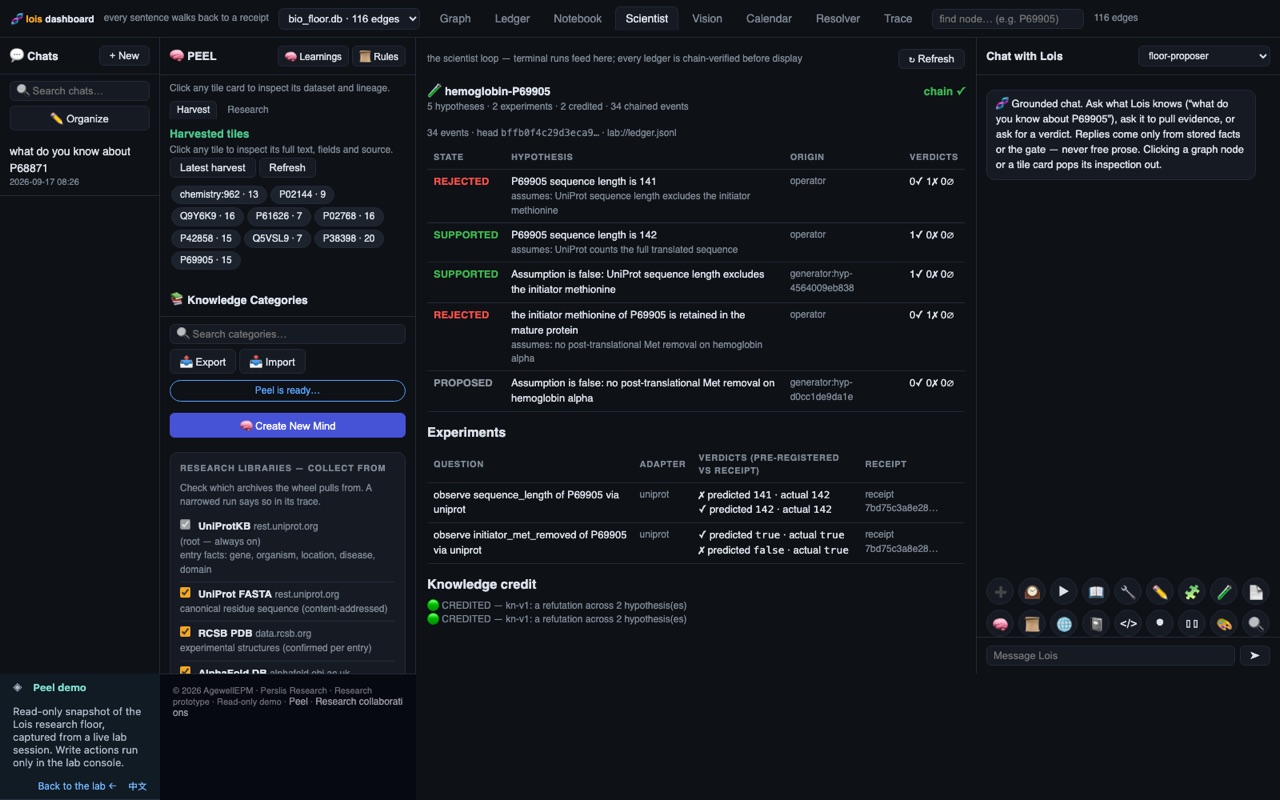
The model never authors a fact: in the AI-scientist run the LLM hypothesizes/discusses from a neutral empty cwd; only extract.* writes to the floor. The local proposer's text is narration, not control flow — the floor's significance test determines the verdict.
REAL: ledger, hash chain, confidence, live fetches, significance test. dogfood_science_loop.py is fully deterministic (no LLM). The AI-scientist run degrades gracefully to placeholder text if claude/Ollama are down — the loop's verdict still comes from the floor, not the model.
II·4Discovery — the Null Model
How the system "finds something": pure typed-graph traversal + an exact statistical test. Relevance = reachability; the path is the proof. discovery.py:find_convergences()
What a convergence is
A node reachable by a single typed 1-hop edge from ≥ min_support of the seed proteins. One hop, so each supporter's justification is a single provenance-pinned edge — "the path is the proof" is literal.
The test (exact hypergeometric — no approximation)
Under H0 the n seeds are a random subset of the N seed-type nodes;
the count reaching node v ~ Hypergeometric(N, m, n).  Enrichment p = P(X ≥ k):

  p = Σ (i=k..min(m,n))  C(m,i)·C(N−m, n−i)  /  C(N, n)     (exact math.comb)

  N = distinct subjects of the seed type in the whole floor  (≥ #seeds)
  m = distinct seed-type subjects linking to v anywhere       (≥ k)
  k = how many seeds reach v
  significant = (N > #seeds) AND (p ≤ alpha=0.05)
Fail-safe toward non-discovery: any degenerate input returns p=1.0 — never a finding (discovery.py:30-44).
Worked cases: a universal hub (organism:homo_sapiens, m==N) → p=1 → rejected; a rare shared domain:globin → tiny p → a real finding; a tiny floor (N==n) → every p=1 → honestly "insufficient background."
Honest caveat: there is no multiple-testing correction — alpha=0.05 is applied per candidate node, not Bonferroni/FDR-adjusted across all nodes scored in one call. And degree (hubness) is reported but is not part of the p-value.
II·5Proposer → Gate → Floor
How a local model participates without ever being trusted: it emits a strict JSON proposal, a gate parses it with zero salvage, a symbolic resolver binds the accession, and only the floor writes. proposer/runtime.py
The pipeline
1. MODEL   local Ollama `floor-proposer`, temp 0 → a JSON proposal string  (runtime.py:37)
2. STRICT PARSE  kind ∈ {claim, extract, intent, abstain}; every field hard-validated;
              the ONLY salvage is stripping a ```json fence — "salvage is where hallucinations sneak in"  (contract.py:21)
              malformed → rejected_unparseable (raw reply truncated to 500 chars)
3. SYMBOLIC RESOLVE  bind name→accession (below)
4. FLOOR ADMIT  extract → extract_protein (ONLY write path, provenance-pinned)
              claim → evaluate (verdict+trace, NOTHING written)
              intent → plan-only preview (NO physical dispatch here)
              abstain → recorded no-op
The resolver — the real safety layer ENGINE
Name→accession binding is symbolic lookup only, never model recall (three training rounds proved a 3B model hallucinates or over-abstains accessions — resolver.py:1-23). Sources: a curated KNOWN_PROTEINS table (word-boundary, longest-first, extension-blocked so "insulin receptor" ≠ "insulin") + literal accessions re-validated by the one validator.
subject already grounded in the user's words → pass
exactly one grounded, model named another    → repaired (overridden with the evidence)
nothing grounded / ambiguous                  → forced abstain
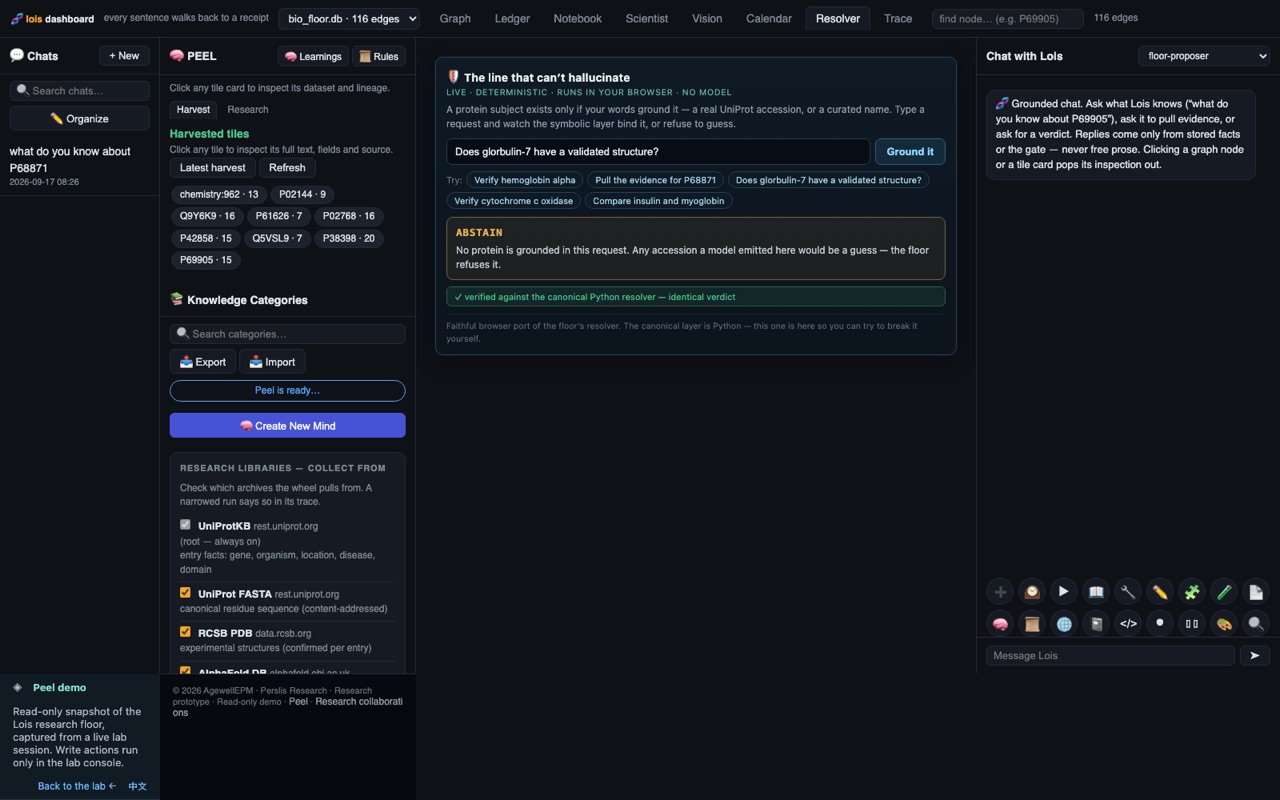
The wrong-accession hole is closed structurally: a well-formed, verifiable accession about the wrong protein was the one failure the floor couldn't catch. Now it cannot be emitted — the model can only propose a subject the user's own text grounds. A fictional name ("glorbulin-7") has no curated match and no valid accession form → forced abstain regardless of what the model said.
II·6The Floor Engine, deep (PEEL)
The typed store where the symbolic layer is the only author of facts. Structural — not statistical — hallucination prevention. peel/relation_schema.py, peel/floor.py, reasoner.py
Functional hard-veto
Relations carry a functional flag (at most one object per subject — an OWL FunctionalProperty). The veto primitive _are_compatible returns False unconditionally when two objects of a functional relation differ — not averaged, not confidence-weighted (relation_schema.py:687-698). Functional relations include has_sequence, predicts_structure, has_formula, has_iupac_name, has_inchikey, has_weight, on_chromosome, has_biotype, variant_significance, interpro_type, variant_consequence, drug_inchikey.
Verdicts (SUPPORTED / CONFLICTING / UNKNOWN)
reasoner.evaluate_claim walks edges in order, accumulating an edge-ID trace — "a verdict without a trace is invalid by construction."
Missing evidence at any tier → UNKNOWN (abstain, never guess). Two distinct objects on a functional relation, or an AlphaFold accession mismatch → CONFLICTING. Else → SUPPORTED.
Fictional accession → UNKNOWN with 0 edges: the extractor writes nothing (UniProt NOT_FOUND), so the reasoner finds no has_sequence edge and abstains at step 1.
Provenance & the canonical-37 trace
Every write goes through Store.add_edge, which runs validate_provenancebefore any insert — required keys {source,url,retrieved_at,raw_id}, an allowlisted https host, UTC timestamp; any violation raises and nothing is written. Each fact also becomes a canonical-37 tile (the responses column set); the writer enforces 37/37-or-nothing (the codified lesson from the wiki-wheel 33/37 regression). Tile IDs are content-addressed → idempotent re-extraction.
Test posture:533 passed in 8.08s.
Honest coverage gaps: the verdict-time veto in reasoner.py is wired for slice-1 relations (has_sequence, predicts_structure) — the other functional relations carry the flag and the primitive would veto them, but no evaluator walks them for a verdict yet. The batch detect_contradictions() scanner also doesn't cover the bio functional relations (only located_in among them). These are coverage gaps, not correctness bugs in the primitive. Edge confidence is always 1.0 — the veto is identity-based, not confidence-based. Label: PILOT-READY.
II·7The Robot / Lab Handoff
How a verified claim becomes a physical experiment — and the honest truth about what's actually wired. handoff.py, environments.py, capabilities.py, planner.py
The lifecycle
build_contract  package verdict+trace+witnesses + caller's predicted_outcome + execution_request,
                 content-address the whole body with SHA-256  (a trace edge with no provenance RAISES)
dispatch_handoff verify integrity → CONFLICTING? refuse & record → else plan_intent against the
                 environment's discovered capabilities → PLANNED? env.submit(contract, plan)
check_handoff   poll env.check(ref)  — the terminus stays in control (not fire-and-forget)
collect_result  re-verify integrity → record outcome → gate physical evidence into the floor
list_handoffs   the audit trail — every dispatch, including every refusal
An environment advertises typed capabilities — aspirate, dispense, mix, heat, measure_absorbance, read_sensor, label — each with a machine-checked parameter schema (bounds on volume, temp, wavelength…). The planner composes an intent (e.g. serial_dilution) only from capabilities the chosen environment exposes; a missing capability → UNPLANNABLE with the exact missing_capabilities, recorded and refused — "never partial, never substituted, never guessed."
Evidence re-entry (double-gated)
Only a physical-grade environment returning confirmed/refuted materializes supports_claim/conflicts_with edges from each structure: witness to the claim, provenance source="executor". A simulation can never become graph evidence.
THE HONEST TRUTH — no real robot exists. Two adapters ship: simulation (evidence_grade="simulated", a toy Beer-Lambert bench that always returns "inconclusive" — structurally cannot become a fact) and human_tech (evidence_grade="physical", but the "executor" is a person: submit writes a numbered work-order .md + .json to an outbox, collect parses a human-written result file). The plug-in seam for a real instrument (pkg.mod:ClassName — "Emerald Cloud Lab, Strateos, a robot bridge") exists, but no such adapter is implemented. Physical robot dispatch is architecturally ready, not built. Do not describe this system as driving a robot today.
II·8Self-Bootstrap Datasets
How the floor turns what it grounded into training data for the next honest model — and teaches it to abstain. datasets.py, proposer/knowledge_dataset.py, dogfood_build_sml.py
symbolic_floor — build an sml
Self-bootstrap — build an SML · the gather run from the video, replayed live.
Two generators
Generator
Output
Witnessed-only rule
datasets.py
relations / features / qa exports + a provenance manifest
reports provenance coverage (a metric; allows manual/executor rows with url=None)
knowledge_dataset.py
MLX-LoRA chat corpus (train/valid/eval)
structurally excludes unprovenanced edges via an inner JOIN on edge_provenance — no provenance row ⇒ cannot be a training answer
The build-SML pipeline
GATHER   extract real molecules + proteins + genes through the floor (every fact witnessed)
DISTIL   knowledge_pairs JOIN edge_provenance → grounded Q&A; seeded shuffle (seed 20260918)
           split: ~15% eval, ~10% valid, rest train (each ≥4 rows)
ABSTAIN  fixed not-in-floor subjects (ZZFAKE1, unobtainium-9, sparklonin…) →
           "I do not have a verified record for that, so I won't guess."   ← teaches refusal
VALIDATE assert role order [system,user,assistant], no empty turns, every fact = a real edge
TRAIN    mlx_lm.lora --model ...Llama-3.2-3B-Instruct-4bit --train --data <dir> --iters 300 ...
The self-bootstrap claim, verified: the floor gathers grounded truth → distils witnessed-only training data → the exact command to train a model that abstains instead of hallucinating. "No unwitnessed gold. No MCP." (Vol I·2.7 shows it running live.)
— END OF VOLUME II — continue to Volume III (the course) & Volume IV (the map).
WelcomeThe Symbolic Floor: A Complete Course
A patient, step-by-step course that turns a total beginner into a confident expert.
What this book is
This is a course, not just a reference. If you read it from front to back and do the small exercises along the way, by the end you will be able to sit down at a computer, open the program, ask real questions about biology, and trust the answers you get. You will also earn a Certificate of Completion — a friendly way of saying: you now know this tool well enough to use it on your own, and to help someone else use it too.
We wrote it in the spirit of the great old computer manuals — the ones that assumed you had never touched the thing before, explained every single word, and never made you feel foolish for asking. There is no such thing as a silly question here. If a word looks like jargon, we stop and define it on the spot.
Who this book is for
You. Especially if you have never used a "terminal" before (don't worry — we will explain exactly what that is on the Start page). You do not need to be a scientist. You do not need to be "good with computers." You need only curiosity and the willingness to type a few words and press a key. Everything else, we teach.
If you have ever typed a search into a website and read the results, you already have every skill you need to begin. Truly.
What the Symbolic Floor is, in plain words
The Symbolic Floor is a program you talk to by typing questions. It answers questions about biology — genes (the instructions living things are built from), proteins (the tiny machines those instructions build), molecules (the chemical building blocks of everything), diseases, and drugs. Here is the part that makes it special, and unlike almost anything else you may have tried: it can only tell you things it can prove from real, trusted scientific databases. It cannot make things up. If it does not have a verified answer, it will simply, honestly, tell you so.
Compare that to the chat programs you may have heard about, which will happily guess — and sometimes guess wrong while sounding perfectly confident. The Symbolic Floor is built on the opposite promise: it would rather say "I don't know" than tell you something untrue. That single difference is the heart of this whole course.
How to read this book
The book is arranged in three parts, in order. Please read them in order the first time through:
Orientation — the three pages you are reading now. What the tool is, the big ideas behind it, and your very first five minutes at the keyboard.
The 12 Lessons — one gentle step at a time, starting from Lesson 1. Each lesson builds on the one before it. Each ends with a tiny exercise so the knowledge sticks.
Certification — a short, friendly review at the end. Pass it and you are, officially, a Symbolic Floor expert.
What you'll be able to do by the end
Open the program by yourself, with no help.
Ask questions about a gene, protein, molecule, disease, or drug — and get a trustworthy answer.
Read the "receipt" attached to every answer, so you can see exactly where the fact came from.
Recognize when the tool is honestly saying "I don't know" — and understand why that is a good thing.
Explore its special tools for genes, chemistry, and guided tours.
Explain all of this, plainly, to a friend or family member.
Take your time. This book will wait for you. There is no clock, no grade for speed, and nothing you can do at the keyboard that will break anything. Ready? Turn to the next page.
IdeaThe Four Big Ideas
Before you touch the keyboard, meet the four simple ideas that make this tool trustworthy.
You do not need to memorize these. Just read them once, the way you'd listen to a friend explain something over coffee. They will make everything in the lessons feel obvious later.
Idea 1 — Grounding: every fact comes with a receipt
When the Symbolic Floor tells you something, it also tells you where it learned it. Every single fact arrives with a little "receipt" — the name of a real scientific database it came from (places with names like UniProt for proteins, PubChem for molecules, or ClinVar for disease-related genes) and often a web link you can follow to see it yourself.
Picture a careful research librarian. When you ask a librarian a question, they don't answer from foggy memory — they walk to the shelf, pull down the exact book, and place it open in front of you, finger on the line. That is grounding: the tool always shows you the book. A claim without a source is not allowed to reach you.
Idea 2 — The floor writes the facts, not the AI
There are two parts working together inside this program. One part is the AI — it is good at wording things nicely and talking to you in plain sentences. The other part is the floor — a verified store of checked facts. Here is the strict rule that keeps you safe: only the floor is allowed to state a fact. The AI may arrange those facts into a friendly sentence, but it is forbidden from inventing even one detail of its own.
Think of it like a courtroom. A talented lawyer can present the evidence clearly and warmly — but the lawyer is not permitted to make evidence up. Only what is entered into the record counts. The floor is the record. The AI is just the voice reading it aloud.
Idea 3 — It abstains: "I won't guess"
When the tool has no verified record for what you asked, it does not scramble to fill the silence. It says, plainly, something like: "I do not have a verified record for that, so I won't guess." This is called abstaining — choosing to say nothing rather than say something unproven.
This may feel strange at first. We are used to machines always having an answer. But consider who this tool is built for: people who genuinely cannot afford a wrong answer — someone looking up a medicine, a family understanding a diagnosis, a caregiver making a real decision. For them, a confident wrong answer is worse than no answer at all. So the tool's honesty is not a weakness. It is the entire point.
A tool that admits what it doesn't know is a tool you can actually trust with what it does know.
Idea 4 — No internet-guessing, and it works offline
The Symbolic Floor does not roam the open internet grabbing whatever it finds, and it does not lean on outside helpers to fetch mystery answers. It reads only from a fixed, trusted list of real science databases — the same reliable sources scientists use. Because those trusted facts are kept close at hand, the tool can work offline: no signal, no wifi, no problem.
This matters more than it sounds. The open internet is full of half-truths, outdated pages, and confident nonsense. By refusing to guess from that noise and sticking to a curated shelf of vetted sources, the tool trades "a little of everything" for "only what's been checked." For the people it serves, that trade is exactly right.
That's it — four ideas: show the receipt, the floor writes the facts, honestly abstain, and trusted sources only. Keep them in the back of your mind. Now let's go turn the thing on — the next page is your very first five minutes.
StartYour First Five Minutes
Deep breath. In five minutes you'll have the program open and running. Let's go together.
First, what is "the Terminal"?
The Terminal is simply an app on your computer — a plain window where, instead of clicking buttons, you type a word and press the Enter key. The computer reads what you typed and does it. That's the whole idea. It looks old-fashioned, but it is calm, quiet, and very powerful. There is nothing to be afraid of here.
A command is just a word (or a few words) you type to tell the computer to do something. You type it, you press Enter, and it happens.
How to open the Terminal on a Mac
It takes three steps. Go slowly:
Hold the Command key and tap the Space bar together. A little search box appears in the middle of your screen. (This search box is called Spotlight.)
Type the word Terminal into that box.
Press Enter. A window opens — usually with a dark or plain background and a blinking line waiting for you. That window is the Terminal. You made it!
Your very first command
In that window, type this single word:
science
Now press Enter. In a moment, you will see something like this appear:
◫ S C I E N C Eresearch lane: wired — "lois <question>" runs a PEEL-gated pass
science tools: crispr · discover · research · chemistry · tour · evolution · build-sml — type demos for the menu
❯
Congratulations — the Symbolic Floor is now running and waiting for you.
Understanding what you're looking at
See that little ❯ symbol on the last line? That is called the prompt. It is the program's polite way of saying: "I'm ready — your turn. Type something and press Enter." Whenever you see the ❯, the tool is patiently waiting for you. It will wait as long as you like.
Try the menu
Let's ask it to show you what it can do. At the ❯ prompt, type:
demos
Press Enter, and a friendly menu of things to try will appear. We will walk through these together, one by one, starting in Lesson 1. For now, it's enough just to see them listed.
You cannot break anything. Nothing you type at this prompt will harm your computer or the program. If something looks confusing, that is normal and expected — keep going. When you want to leave, simply type exit and press Enter, and you're back to the ordinary Terminal.
You did it!
Take a moment. You just opened a real terminal, launched a real scientific program, and read your first prompt. That is genuinely the hardest step for most beginners — and it's already behind you. Everything from here is just learning what to type, one gentle lesson at a time.
When you're ready, turn to Lesson 1, where we ask the Symbolic Floor its very first real question.
Key terms from this page
Term
What it means
Terminal
The app with a plain window where you type commands and press Enter.
Command
A word (or few words) you type to tell the computer to do something.
Prompt
The ❯ symbol that means the program is ready and waiting for you to type.
REPL
The kind of program that keeps a conversation going: it Reads what you type, works out the answer (Evaluates), Prints it back, then Loops around to wait for your next line. That's all the letters stand for.
science
The command you type to start the Symbolic Floor.
floor
The verified store of checked facts inside the program — the only part allowed to state a fact.
Lesson 1Talk to the Floor
You are about to hold a conversation with a computer that refuses to make things up.
What you'll be able to do
Start the program by typing one word: science
Ask the Floor to research a real molecule by typing chemistry
Read the answer it gives you and understand where every fact came from
Step by step
First, a little vocabulary so nothing surprises you. THE SYMBOLIC FLOOR (we'll just say "the Floor") is a program you talk to by typing words. It shows you a small symbol called a prompt — the little ❯ character — which is the Floor's way of saying "I'm listening, type something." You type a word, press Enter, and it answers. That's the whole idea. No mouse, no menus — just words.
Step 1 — Launch the Floor. At your computer's terminal (the plain text window where you type commands), type the word science and press Enter. This starts the program. After a moment you'll see the prompt appear:
❯
That blinking prompt means the Floor is ready and waiting for you.
Step 2 — Ask for chemistry. Type the word chemistry and press Enter. This tells the Floor: "Go research a real molecule for me, live, from a real chemistry database." Here is what you'll see:
❯chemistry⚗️ FLOOR CHEMISTRY DOGFOOD (fresh floor, live PubChem, no MCP)
2) research 'water' → resolve name → PubChem CID → pull + tile
resolved: water → PubChem CID 962; wrote 12 edges + 13 PEEL tiles✓ DOGFOOD PASSED — the floor researches molecules by name, learns real chemistry
What just happened. You asked the Floor about water, and it did four honest things. (1) It took the plain English word "water" and looked it up in PubChem — a free chemistry database run by the United States government. (2) PubChem told it water's official ID number, called a CID: here, CID 962. Think of a CID like a library call number — it points to exactly one thing and nothing else. (3) It pulled back real facts about water: its chemical formula, its weight, its other names. (4) It stored those facts. When it says "12 edges," that just means 12 facts. When it says "13 PEEL tiles," those are the record cards it filed the facts on — one tidy card per piece of information. The green ✓ is the Floor telling you the whole errand succeeded.
The most important idea in this entire course is hidden in that little output: every fact has a receipt. The Floor did not "remember" that water is CID 962 from some blurry memory — it went and looked it up, wrote down where it found it, and kept the source link. If you ever ask "says who?", the Floor can point at the exact database entry. That is what makes it trustworthy.
Try it yourself
Exercise 1. Launch the Floor with science, then type chemistry. Watch the line that starts "resolved:" and read the CID number aloud. You just read a real US-government ID for water.
Exercise 2. Count them yourself. In the output, find where it says how many edges and how many tiles it wrote. (You should see 12 edges and 13 PEEL tiles.) Notice that "edges" and "tiles" are two different counts — facts versus cards.
A common mix-up. Don't type chemistry into your regular terminal before you've launched the Floor with science. The word chemistry only means something inside the Floor, once you see the ❯ prompt. If nothing happens or you get an "unknown command" message, you probably forgot to run science first.
Key terms
Term
Meaning
The Symbolic Floor ("the Floor")
The program you talk to by typing words. It only states facts it can back up.
Prompt (❯)
The little symbol that means "I'm ready, type something and press Enter."
science
The command you type to start the Floor.
chemistry
A word you type inside the Floor to make it research a real molecule (water) live.
PubChem
A free, real chemistry database run by the US government.
CID
PubChem's ID number for one exact substance. Water is CID 962. Like a library call number.
Edge
One stored fact.
PEEL tile
One record card holding a fact, with its source link attached.
Receipt
The proof of where a fact came from. Every fact the Floor keeps has one.
✓ What you learned
You start the Floor by typing science and talk to it at the ❯ prompt.
Typing chemistry makes it research water live in a real government database.
It found water's ID (CID 962) and stored 12 facts on 13 record cards.
Every single fact comes with a receipt — the Floor never just "makes it up."
Lesson 2Research a Gene
Now you'll point the Floor at a real human gene and get back a full, source-backed report — in seconds.
What you'll be able to do
Ask the Floor to build a research report about a gene by typing crispr followed by the gene's name
Recognize the four kinds of information it gathers
Understand, in plain words, what a gene, a CRISPR guide, and a "pathogenic variant" are
Step by step
A quick word first. A gene is a stretch of your DNA — the instruction booklet inside your cells — that tells the body how to build one particular part. The gene we'll use is called EGFR. It's a real human gene, and when it goes wrong it's involved in several cancers, so scientists study it constantly. That makes it a great, well-documented example.
Step 1 — Make sure the Floor is running. If you don't see the ❯ prompt, type science and press Enter first (just like in Lesson 1).
Step 2 — Ask about the gene. Type the word crispr, then a space, then the gene name EGFR, and press Enter:
What just happened. You handed the Floor a gene name, and it assembled a dossier — that's just a fancy word for an organized file of everything known about one subject. Let's translate the three numbered lines:
CRISPR GUIDES.CRISPR is a laboratory tool that can find and cut a chosen spot in DNA — a bit like "find and replace" in a word processor, but for genes. A guide is the little piece that tells CRISPR where to aim. The Floor found the gene in Ensembl (a major genetics database), noted its ID ENSG00000146648 and that it lives on chromosome 7, then counted 995 PAM sites — 995 real spots in the DNA where a guide could legally aim.
CLINICAL VARIANTS. A variant is a spelling change in the gene. A pathogenic variant is a spelling change known to cause disease. The Floor found 251 of these listed in ClinVar, a public database of disease-linked gene changes.
TARGET BIOLOGY. Genes are the recipe; proteins are the thing the recipe builds. EGFR's protein is catalogued as P00533, has 5 real lab-made 3-D pictures ("experimental structures"), and touches 199 other proteins ("interactors").
Here's the part that matters most: every CRISPR guide is computed from the real DNA sequence. The Floor cannot invent a guide for a spot that doesn't exist, because it reads the actual letters of the gene first and only counts real targets. It's math on real data, not guesswork.
Try it yourself
Exercise 1. Run crispr EGFR and find the chromosome number in the GUIDES line. (Answer: chromosome 7.)
Exercise 2. Try a different real gene. Type crispr TP53. Then try crispr BRCA1. Other valid genes to explore: KRAS, BRAF, MYC, PTEN, VEGFA, TNF, HBB, HBA1, MB.
Exercise 3. For any gene you try, read the CLINICAL VARIANTS line and say out loud how many pathogenic variants it found.
Caution — this is design-grade, not medical advice. The Floor helps you plan and understand. It is a research and design tool. It is not a wet-lab result and not a medical product. Nothing it shows you diagnoses, treats, or advises on any person's health. If a real medical or clinical decision is involved, that belongs to qualified professionals with laboratory confirmation.
Key terms
Term
Meaning
Gene
A stretch of DNA that carries instructions for building one part of the body.
EGFR
A real human gene studied in cancer research; our example.
CRISPR
A lab tool that finds and cuts a chosen spot in DNA. Like "find and replace" for genes.
Guide
The piece that tells CRISPR exactly where in the DNA to aim.
PAM site
A real spot in the DNA where a guide is allowed to target. EGFR has 995 in the region checked.
Variant
A spelling change in a gene.
Pathogenic variant
A spelling change known to cause disease.
Ensembl / ClinVar
Major public databases: Ensembl for genes, ClinVar for disease-linked variants.
Protein / interactor
The thing a gene builds (protein); other proteins it works with (interactors).
Dossier
An organized file of everything the Floor gathered about one subject.
✓ What you learned
Typing crispr EGFR builds a four-part dossier about a real gene.
You met the ideas of a gene, a CRISPR guide, a PAM site, and a pathogenic variant.
Every guide is computed from the real DNA — the Floor can't invent one that isn't there.
This is a design and research aid, honestly labeled: not a wet-lab or medical product.
Lesson 3Read a Dossier
No new commands this time — just the skill of reading what the Floor already told you, and knowing you can trust it.
What you'll be able to do
Read each of the four sections of a gene dossier and say what it means
Explain "provenance" and "source-pinned" in plain words
Sanity-check any claim by following it back to its source
Step by step
Let's re-read the crispr EGFR report from Lesson 2, slowly, one section at a time. Keep it in front of you:
Section 1 — GUIDES. Read this as: "To target EGFR, here's where you could aim." The gene was located in Ensembl (ID ENSG00000146648, on chromosome 7), and 995 legal aiming spots were counted in a 6,000-letter window of DNA.
Section 1.5 — CLINICAL VARIANTS. Read this as: "Here's how often this gene is known to break in a disease-causing way." 251 disease-linked spelling changes are on file in ClinVar.
Section 2 — TARGET BIOLOGY. Read this as: "Here's the actual protein this gene makes, and how well we understand its shape and its friends." Protein P00533, with 5 real lab-made 3-D structures and 199 partner proteins.
The TRUST line. The closing ✓ EVERYTHING TALKS is the Floor's summary that all these pieces — gene, sequence, structure, interactions, pathways — connected up cleanly, each drawn from a named database rather than from thin air.
What just happened — the big word, made small.Provenance simply means "where a thing came from." When we say the dossier is source-pinned, we mean every line is nailed ("pinned") to a specific source — a named database and a web address — so you can always trace it back. Notice how each fact carries its home right in the text: Ensembl for the gene ID, ClinVar for the variants, UniProt/PDB for the protein. Those aren't decoration. They are the addresses of the receipts.
Reading a dossier — a short walkthrough
Here is the habit to build. For any line, ask three questions:
What does it claim? ("EGFR has 251 pathogenic variants.")
Who says so? Find the database name in the same line. ("ClinVar.")
Could I check it? Yes — that database is public. You could open ClinVar, search EGFR, and see the list yourself. A claim you could verify is a claim you can trust.
This is the difference between a system that sounds confident and one that is accountable. The Floor is the second kind. It never asks you to take its word for it.
Try it yourself
Exercise 1. Looking at the EGFR dossier, find the Ensembl ID. (It's on the GUIDES line: ENSG00000146648.)
Exercise 2. Find how many experimental structures the protein has. (It's on the TARGET BIOLOGY line: 5.)
Exercise 3. Pick any one number in the dossier and name the database that stands behind it. If you can name the source, the claim is source-pinned.
A trap to avoid. Don't treat a number as true just because it looks precise. "251" is only trustworthy because it names ClinVar beside it. If you ever see a confident-sounding claim with no source next to it, that's exactly the kind of thing the Floor is built to refuse — and it's the kind of thing you should distrust anywhere else, too.
Key terms
Term
Meaning
Dossier
The organized report the Floor builds — here, four sections about one gene.
Provenance
Where a fact came from. Its origin story.
Source-pinned
Every line is fastened to a named database and web address you can check.
GUIDES section
Where in the DNA you could target the gene (Ensembl ID, chromosome, PAM sites).
CLINICAL VARIANTS section
Known disease-causing spelling changes (from ClinVar).
TARGET BIOLOGY section
The protein the gene makes, its 3-D structures, and its partners (UniProt/PDB).
TRUST line
The closing summary that all pieces connected and each came from a named source.
Sanity-check
To follow a claim back to its source and confirm it for yourself.
✓ What you learned
A dossier has four readable parts: GUIDES, CLINICAL VARIANTS, TARGET BIOLOGY, and a TRUST line.
"Provenance" means where a fact came from; "source-pinned" means it names that source.
You check any claim with three questions: what, who says so, could I verify it.
A confident claim with no source beside it is a red flag — the Floor never leaves one.
Lesson 4Use Peel & the Honesty Gate
Meet Lois — a strict fact-checker you can switch on when you need to be absolutely sure.
What you'll be able to do
Check the Floor's honesty settings safely with peel
Turn on the strict evidence gate with lois
Run a proof-checked question and turn the gate back off when you're done
Step by step
Two new words, and one big idea. The idea: the Floor has a switch that makes it even stricter — refusing to give any answer that isn't backed by proof. We call the strict mode Lois. Think of Lois as flipping on a very serious fact-checker who stands at the door and turns away anything without evidence. And there's a companion word, peel, that lets you peek at the settings without changing anything.
Step 1 — Look before you touch: peel. The word peel is read-only — it reports, it never changes anything. Type it to see the science status: is the proof gate armed? Is the research lane wired up? Is the ledger present? (The ledger is the Floor's running record book of what it has done.)
❯peel
Because peel only looks, you can type it any time, as often as you like, with zero risk. It's the safe way to check "what state am I in right now?"
Step 2 — Arm the honesty gate: lois. When you type lois by itself, you arm the PEEL proof gate. From that moment, any research the Floor does must cross a grounded PEEL evidence gate — and it's fail-closed, meaning if the proof isn't there, the answer does not get through. Better a silence you can trust than a confident guess. You'll see this line:
❯lois◫ Lois online — Peel symbolic gate ACTIVE · research now requires grounded PEEL evidence · "lois off" to release
Step 3 — Ask a proof-checked question. You can arm the gate and ask a question in one move: type lois, a space, then your question. It turns the gate on and immediately runs a proof-gated research pass on that question:
❯lois what is EGFR
Step 4 — Release the gate when you're done. Type lois off to switch the strict mode back off and return to normal (advisory) mode:
❯lois off
What just happened. You learned a "look, then act" pair. peel is your gauge — it tells you whether the strict gate is on, whether research is wired up, and whether the ledger (record book) is present, and it changes nothing. lois is your switch — it turns the strict fact-checker on. "Fail-closed" is the heart of it: when in doubt, the gate stays shut. It would rather give you nothing than give you something unproven. And lois off puts the switch back to easygoing "advisory" mode.
When would you want Lois on?
Turn Lois on whenever you're going to rely on the answer — anything you'll write down, pass along, or make a decision from. The strictness is a feature: it guarantees that what you keep is backed by proof. Leave it off for casual browsing and exploring, when you just want to poke around and don't mind an unverified lead. A simple rule: casual peeking, gate off; anything that matters, gate on.
Try it yourself
Exercise 1. Type peel and read the status. Are the gate, the research lane, and the ledger all reported? Remember: this changed nothing.
Exercise 2. Type lois and confirm you see the "◫ Lois online — Peel symbolic gate ACTIVE" line. Then type peel again and notice the gate now reads as armed.
Exercise 3. Ask a proof-checked question in one step: lois what is EGFR. When you're finished, release the gate with lois off.
A common mistake. Don't forget to type lois off when you switch back to casual exploring — otherwise the strict gate stays armed and may refuse quick, unproven lookups you didn't mind being loose. And don't confuse the two words: peel only looks and never changes anything, while lois actually flips the switch. If you only wanted to check the status, use peel.
Key terms
Term
Meaning
peel
A read-only word. Reports the science status (gate, research lane, ledger). Changes nothing.
lois
Arms the PEEL proof gate — turns on the strict fact-checker.
lois <question>
Arms the gate and runs a proof-checked research pass on that question right now.
lois off
Releases the gate back to normal (advisory) mode.
PEEL evidence gate
The checkpoint that lets an answer through only if it's backed by grounded proof.
Fail-closed
If the proof isn't there, the gate stays shut — no answer rather than a guess.
Ledger
The Floor's running record book of what it has done.
Advisory mode
Normal, easygoing mode with the strict gate off — fine for casual exploring.
✓ What you learned
peel safely shows you the status and never changes anything.
lois arms the strict, fail-closed proof gate; lois off releases it.
lois <question> arms the gate and runs a proof-checked answer in one step.
Turn Lois on for anything you'll rely on; leave it off for casual browsing.
You now know how to talk to the Floor, research chemistry and genes, read a source-pinned dossier, and switch on strict proof-checking. Next, in Lesson 5, we'll build on these habits.
Lesson 5Watch it Discover Something
Type one word — discover — and watch a whole piece of science happen from start to finish.
What you'll be able to do
Start an autonomous discovery run — "autonomous" just means it drives itself; you don't steer it step by step.
Read the five stages it moves through, in plain English.
Understand three big ideas that make the result trustworthy: a hypothesis, a hash-chained ledger, and "the path is the proof."
Explain who does what: the AI suggests, but the Floor decides — and a bit of arithmetic, not the AI, calls the winner.
Step by step
1. Make sure you are at the prompt (type science if you don't see the ❯). That arrow means "your turn — type something."
2. Type the word discover and press Enter:
❯discover
3. The program prints a banner and walks through five numbered stages (yours will match this shape):
🔬 AI SCIENTIST — autonomous discovery(strong model + local proposer + symbolic floor)1) HYPOTHESIZE"Non-oxygen-transport globins NGB & CYGB converge on
nitric-oxide / oxidative-stress nodes the others don't."
written to ledger hyp-8f3c1a…2) FORMALIZE HBA1=P69905 HBB=P68871 MB=P02144 NGB=Q9NPG2 CYGB=Q8WWM93) RESEARCH pulling grounded facts for each protein…
4) TRAVERSE walking the linked facts, looking for a meeting point…
5) DISCOVERY convergence found · p = 0.0007 · proof: edge e-4471 → e-4489 → e-4502
What just happened. The machine did the whole loop a scientist does. It made a hypothesis — a specific guess written so it can be checked. It gave every protein its official ID (the FORMALIZE step — turning "MB" into the exact accession P02144). Then it gathered real facts, walked the connections, and found two proteins really do link to the same nodes. The p = 0.0007 answers "could this be luck?" — small means "very unlikely." The edge IDs at the end are the actual trail of facts that led to the answer.
The three ideas that make this trustworthy
Hypothesis. A guess stated clearly enough to be tested. "This might be interesting" is not one; "these two proteins converge on stress nodes the others don't" is — you can go check it.
Hash-chained ledger. A ledger is a lab notebook. Hash-chained means each entry carries a fingerprint of the entry before it — like each page stamped with a summary of the last. If anyone tried to change what the machine predicted, every later fingerprint would stop matching. In plain words: the machine cannot secretly rewrite its guess after seeing the answer.
The path is the proof. The answer ends with a chain of edge IDs (one edge = one linked fact). The discovery isn't an opinion; it's real, individually-checkable facts joined end to end. No trail, no claim.
Who does what. The AI may only propose and discuss — the imaginative junior researcher. It never invents facts. Every fact comes from the Floor, and the "is this real?" call is made by the statistical test (the p-value), not by the AI's confidence.
Try it yourself
Run discover and read the five stage headings aloud. Can you say what TRAVERSE does?
Find the hyp- ID on the HYPOTHESIZE line — the fingerprint of the guess. Write it down; the machine can't deny it later.
Look at the p-value on DISCOVERY. Small or big? (Small = unlikely to be coincidence.)
Point to the part that is the proof (hint: the chain of edge IDs, not the sentence).
Gotcha.discover always runs over the same protein family (the globins). It's a guided demonstration, not a free-text search box — typing discover cancer won't switch topics (the extra word is ignored). To point the machine at a disease of your choosing, that's a different command — see Lesson 7.
Key terms
Term
What it means
autonomous
Runs by itself, without you steering each step.
hypothesis
A guess stated clearly enough that you can go and check if it's true.
accession
An official ID number for a protein (e.g. P69905). Like a serial number.
ledger
A running lab notebook — a list of what happened, in order.
hash-chained
Each entry is stamped with a fingerprint of the one before, so nothing can be secretly changed.
edge
One linked fact ("A connects to B"). Chains of edges form the proof.
p-value
A number for "could this be luck?" Smaller = less likely a coincidence.
convergence
Two or more things meeting at the same point.
✓ What you learned
Typing discover runs a complete, self-driving science pass over the globin proteins.
Five stages: HYPOTHESIZE → FORMALIZE → RESEARCH → TRAVERSE → DISCOVERY.
The guess is locked into a hash-chained ledger before any looking, so it can't be faked after.
The AI only suggests; the Floor authors the facts and a statistical test decides if it's real.
Lesson 6The Scientist Loop & Pre-Registration
The single most important habit that keeps a discovery honest: write your predictions down BEFORE you look.
What you'll be able to do
Run the full scientist loop with one word: research.
Understand pre-registration — writing predictions down before you peek — and why it stops you fooling yourself.
Read a set of pass/fail predictions and the final verdict.
Understand the confidence number: where it comes from, and why it's capped near zero when an important prediction fails.
Step by step
1. At the prompt, type research and press Enter:
❯research
2. It states a hypothesis and — the key moment — registers its predictions before doing any research:
🧪 FULL SCIENCE LOOPscientist Ledger × symbolic floor — live, no MCP1) HYPOTHESIS hyp-2b90d4… about human hemoglobin beta (P68871)
2) PRE-REGISTER PREDICTIONS(hash-chained, BEFORE research)
• P68871 sequence length == 147
• has ≥1 experimental structure
• heme molecular weight in [500, 750]
3. Only after those predictions are locked does it research, grade each one, and deliver a verdict + confidence:
3) RESEARCH & GRADE
• sequence length == 147 …………… PASS
• has ≥1 experimental structure … PASS
• heme MW in [500,750] ………………… PASSVERDICT:SUPPORTEDCONFIDENCE:0.94
What just happened. Real science in the right order: state a clear hypothesis about one protein (hemoglobin beta, P68871); write three exact, checkable predictions and lock them into the tamper-proof ledger first; then check, marking each PASS or FAIL; then give a verdict and a confidence score. All three passed → SUPPORTED, confidence 0.94 (94%).
The big idea: pre-registration
Everyone falls into the same trap: look at the data, then decide what you were "expecting," and — surprise — it always seems to confirm it. The cure is pre-registration: write exactly what you predict before you look. Either you called it or you didn't. The Floor doesn't just ask for honesty — it enforces it: predictions go into the hash-chained ledger, so a prediction that appears after the result has no valid place in the chain and the grader refuses to score it.
A prediction registered after the result literally cannot be graded.
Where the confidence number comes from
Confidence is pure arithmetic from the prediction scores — and the AI is not allowed to write it. The key rule: if a key prediction FAILS, confidence is capped near zero, no matter how many others passed:
Two of three still passed — but a core prediction failed, so confidence collapses to 0.05. That refusal to average away a failure is exactly what makes the result trustworthy.
Try it yourself
Run research. Before scrolling to the grades, read the three predictions aloud — you're committing before you look, just like the machine.
Find the line saying predictions are registered BEFORE research. That word "BEFORE" is the whole lesson.
Read the confidence number — close to 1 (all passed) or close to 0 (something important failed)?
Gotcha. A high confidence number does not mean "fully understood" or any medical fact. It means only: "the specific predictions we locked in before looking turned out right." A different set of predictions gives a different number.
Key terms
Term
What it means
scientist loop
The full honest cycle: hypothesize → predict → research → grade → verdict.
pre-registration
Writing predictions BEFORE you look, so you can't fool yourself.
prediction
A specific, checkable claim that comes back PASS or FAIL.
verdict
The overall result — SUPPORTED or NOT SUPPORTED.
confidence
A 0–1 number computed by arithmetic — how well the machine called its shots.
capped near zero
Forced down to almost 0 when a key prediction fails.
✓ What you learned
research runs the full scientist loop over hemoglobin beta (P68871).
Pre-registration locks predictions into the ledger before researching.
A prediction registered after the result cannot be graded — honesty is enforced mechanically.
Confidence is arithmetic the AI can't write, and is capped near zero if a key prediction fails.
Lesson 7Work a Whole Problem
Hand the machine an entire disease and let it organize its own investigation, cycle after cycle.
What you'll be able to do
Run an autonomous campaign — "go work this whole problem for me."
Type a console command and know what each part means.
Read the cycles and understand how the machine grows its own frontier (to-do list).
Say honestly what "solve X" does and does not mean.
A new kind of command
So far you typed single words at the ❯ prompt. This lesson uses a console command — a longer instruction typed at your computer's ordinary command line. You type it exactly as printed:
python -m symbolic_floor.campaign lymphoma└──┬──┘ └┬┘ └──────────┬─────────┘ └──┬───┘
python run the "campaign" tool the problem
itself the inside the Symbolic to solve
tool Floor toolbox
In words: "Use python to run the campaign tool inside the Symbolic Floor, and give it the problem lymphoma." The last word is the only part you'd change.
Step by step
1. Type the command and press Enter:
python -m symbolic_floor.campaign lymphoma
2. It looks up the genes already known to matter for lymphoma — its seeds — and prints them:
3. It works in cycles: research the current list, then discover new connected genes ("interactors") and add them to a growing list called the frontier:
What just happened. The machine started from the seeds (ten genes already tied to lymphoma), researched each through the Floor (every fact grounded and source-pinned), then found what those genes connect to — their interactors — and added them to its frontier, its own growing to-do list. Cycle 1 grew it by 20 genes; cycle 2 begins on the bigger list. Nobody hands it the next step — it works out its own next step from what it just found.
Read this before you get excited — it matters. "Solve X" does not mean the machine cures lymphoma, and it is not medical advice. It delivers grounded target discovery and evidence assembly: real genes and proteins connected to the disease, each traceable to a source — but none is a validated treatment. Think of the output as a well-organized reading list for real scientists, never a prescription. For a real illness, talk to a doctor.
Try it yourself
Run the command and count the seeds (ten in the example).
Read the frontier +20 line — those genes the machine found on its own.
Swap the last word: python -m symbolic_floor.campaign leukemia. Notice the seeds change.
Key terms
Term
What it means
console command
A longer instruction typed at your computer's command line to run one tool.
campaign
A sustained, self-extending investigation of a whole problem, run in cycles.
seed
A known starting point — a gene already tied to the disease.
cycle
One round of "research the current list, then grow the list."
frontier
The machine's growing to-do list of things it still wants to research.
interactor
Something a gene or protein connects to; discovered interactors feed the frontier.
self-directed
Decides its own next step from what it just found.
✓ What you learned
python -m symbolic_floor.campaign lymphoma hands the machine a whole disease.
It starts from seed genes, researches each, and finds what converges.
It grows its own to-do list (the frontier) from discovered interactors, cycle after cycle.
"Solve X" = grounded target discovery — not a cure and not medical advice.
Lesson 8Predict a Trial
The machine estimates the odds a drug trial succeeds — and shows you every factor behind the number.
What you'll be able to do
Run the trials tool with a console command.
Read a JSON result — a tidy way computers print labeled answers.
Understand a success probability and the factors that build it.
Know what this tool is for — and what it must never be used for.
Step by step
1. A console command, like Lesson 7:
python -m symbolic_floor.trials EGFR "lung cancer"└───┬──────────────────┘ └─┬┘ └────┬─────┘
run the "trials" tool the the disease
inside the Symbolic Floor gene (quotes keep two words together)
The disease is in quotation marks because it has a space; the quotes tell the computer "these two words are one thing."
What just happened. You asked: "How likely is a phase 2 trial of a drug aimed at EGFR for lung cancer to succeed?" It answered 38% likely to succeed (so 62% to fail), with a one-line read of PROCEED WITH CARE — not go, not stop, but "coin-flip-ish, tread carefully." Then it lists the factors — the pieces of evidence and weights that added up to 38%. The "phase_2 base rate" of 0.15 is simply the historical fact that phase 2 trials succeed about 15% of the time to begin with. You see the reasoning, not just the verdict.
Why the factors matter
A number alone is a black box — "trust me, 38%." This tool refuses that. By printing the factors it becomes a glass box: you see each ingredient and judge it yourself. A quick word on phase: drug testing happens in stages (phase 1, 2, 3…), each larger and stricter; earlier phases are riskier bets, which is why the base rate starts low.
Gotcha — please read. This is research triage: a way to sort possibilities by rough promise. It is not investment advice and not medical advice. "38%" is a coarse estimate for prioritizing research — never a reason to buy a stock, never a reason to expect or discourage a treatment, never a substitute for a doctor.
Try it yourself
Run it and check: do success_percent and failure_percent add up to 100?
Read the verdict. What is "PROCEED WITH CARE" telling you?
Try python -m symbolic_floor.trials BRAF "melanoma" and compare the success percentages.
Key terms
Term
What it means
JSON
A tidy way computers print answers: labels and values in curly braces.
phase
A stage of drug testing (1, 2, 3…), each bigger and stricter.
success probability
Estimated chance a trial succeeds, as a decimal (0.375) or percent (38%).
base rate
The plain historical starting odds before specifics are added.
factor
One piece of evidence, with a weight, feeding the final number.
research triage
Sorting many options by rough promise so you know where to look first.
✓ What you learned
python -m symbolic_floor.trials EGFR "lung cancer" estimates a trial's chance of success.
The answer is JSON with a success percent, failure percent, and verdict.
It shows the factors behind the number — a glass box, not a black box.
It is research triage only — never investment or medical advice.
You've now run every hands-on loop. In Lesson 9 we keep going with pathogens and compounds.
Lesson 9Research Pathogens & Compounds
Two ready-made tools answer bigger questions: "What can we target in a germ?" and "What's actually in this medicine?"
First, two words you'll keep seeing
A console tool is a program you run by typing a full line and pressing Enter. The lines here begin with python -m symbolic_floor.… — "ask Python to run this particular Floor tool." A pathogen is a germ that causes disease; a target is a protein inside it that a medicine could grab to stop it.
What you'll be able to do
Look up the real, source-pinned drug targets for a named germ.
Ground the actual chemistry of a two-ingredient medicine.
Read the caveats the tools print, and understand why they matter.
Step by step — Part A: the pathogen tool
Type this and press Enter (malaria is our example germ):
What just happened. You typed a plain germ name ("malaria"). The tool translated it into the real organism — Plasmodium falciparum — and found one validated target: a protein called DHFR-TS, ID P13922 (its accession — a permanent unique ID, like a serial number). "struct 5" = five real 3-D structures on file; "inhib 3" = three known blocking molecules; [druggable] = the tool judges it a realistic drug handle. Every number is pinned to a source.
What just happened. "Grounded" means each ingredient was found as a real chemical with a real source. "2/2 ingredients grounded" is a scorecard: both checked out. For each you get its chemical formula (the recipe, like C8H10N4O2) and its MW (molecular weight — roughly how heavy one unit is), plus how many known targets it has.
Try it yourself
Other germs: python -m symbolic_floor.pathogen covid, or … e. coli, … hiv, … tuberculosis.
Run the compound tool on one ingredient or a different pair, e.g. python -m symbolic_floor.compounding aspirin.
Gotcha — this is research, not medical advice. The pathogen tool tells you what science could target; it doesn't prescribe or treat. The compound tool grounds chemistry only — it does not tell you whether two ingredients are safe to mix, at what dose, or for whom (no USP <795>/<797> compatibility checks). These inform a professional's judgment; they never replace it.
Key terms
Term
Plain meaning
console tool
A program you run by typing a full line and pressing Enter.
pathogen
A germ that causes disease.
target
A protein inside a germ that a drug could grab to stop it.
accession (e.g. P13922)
A protein's permanent, unique ID — like a serial number.
druggable
The tool's verdict that a target is a realistic handle for a real drug.
grounded
Found as a real thing with a real source — not invented.
molecular weight (MW)
Roughly how heavy one unit of the molecule is.
✓ What you learned
The pathogen tool turns a germ's name into its real organism and lists source-pinned drug targets.
The compound tool grounds each ingredient's chemistry and targets, with an "N/N grounded" scorecard.
Both stop firmly at the line of medical advice — they inform decisions, never make them.
Lesson 10Teach the Machine: Build a Dataset
The Floor turns its real facts into a study set to train a small AI — and teaches it to say "I don't know."
First, a few words
A dataset (or corpus) is a big organized pile of examples used to teach an AI. To train is to show it that pile until it learns the pattern. An SML is a Small (or Symbolic) Machine Learner — a compact AI you can run on an ordinary computer. The key phrase is "witnessed gold only": only a fact with a real source is allowed to become a training answer.
What you'll be able to do
Run one command that gathers facts and turns them into a train-ready study set.
Read the four stages the builder walks through.
Explain why the "I don't know" cards are the secret sauce.
Step by step
This one is a word at the Floor's own ❯ prompt (after launching with science). Type:
build-sml
🧠 BUILD AN SML FROM GATHERED DATAgather → grounded corpus → train-ready1) GATHER — molecule water/caffeine/aspirin/glucose/ethanol/acetic acid → ok ; protein P69905/P68871 → ok2) DISTIL → 124 grounded Q&A pairs · train 94 / valid 12 / eval 18
3) SHOW → Q: chromosome of gene ZZFAKE1?
A: "I do not have a verified record for that, so I won't guess."5) TRAIN → mlx_lm.lora --model …Llama-3.2-3B-Instruct-4bit --train … (corpus train-ready NOW)
What just happened.GATHER: pulled in real, grounded facts about some molecules and two proteins (each ok). DISTIL: boiled them into 124 question-and-answer pairs, split into three piles — 94 to train on, 12 to validate while training, 18 held back to test the finished AI honestly. SHOW gives a sample card — a trick question: ZZFAKE1 is a made-up gene, and the correct answer taught is "I do not have a verified record for that, so I won't guess."TRAIN prints the actual command and confirms the study set is ready now.
The big idea, in plain words
Most AIs are rewarded for always having an answer, so they learn to bluff. This does the opposite: by slipping fake questions like ZZFAKE1 into the study set — with the right answer being "I don't know" — it teaches the small AI that admitting ignorance is a right answer. With "witnessed gold only," you get an AI that would rather say "I can't verify that" than invent a fact.
Try it yourself
Run build-sml and read each stage aloud. What do GATHER, DISTIL, and TRAIN each do?
Find the "SHOW" line. Explain why teaching the fake gene ZZFAKE1 is a good thing.
Notice the split — 94 / 12 / 18. Which pile is the "honest final exam" the AI never peeks at?
Gotcha. Building the study set is not the same as finishing the training. build-sml gathers facts and prints the training command — but the actual multi-hour training is a separate, heavier step. "Corpus train-ready NOW" means the flashcards are ready, not that a trained AI popped out.
Key terms
Term
Plain meaning
dataset / corpus
A big organized pile of examples used to teach an AI.
SML
A Small/Symbolic Machine Learner — a compact AI you can run on a normal computer.
train
Showing the AI the pile of examples until it learns the pattern.
train / valid / eval split
Study-from, check-against, and a held-back honest final exam.
witnessed gold only
Only a fact with a real source may become a training answer.
ZZFAKE1
A deliberately fake gene, used to teach the AI to answer "I don't know."
✓ What you learned
build-sml turns gathered facts into a train-ready study set: gather, distil, show, train.
The set is split into train / validate / evaluate so the finished AI gets an honest exam.
Fake questions like ZZFAKE1 plus "witnessed gold only" teach the AI to admit ignorance.
Lesson 11Operator Tools: Keep the Floor Healthy
The lesson for the person who runs the Floor: the caretaker, the factory, and the writer.
What you'll be able to do
Recognize the three operator tools and say what each is for.
Back up, verify, and restore the Floor's memory — and check whether it's healthy.
Understand how the Floor builds a helper agent and turns its journal into a paper.
Tool 1 — ops: the caretaker (disaster recovery + health checks)
ops is the janitor and nurse rolled into one. It protects the Floor's stored knowledge (its database, or "db" — the file where the facts live) and tells you whether the system is well. It's a runbook you can run:
python -m symbolic_floor.ops backup <db> <dir> — make a safe copy. python -m symbolic_floor.ops verify <backup> — confirm a backup is intact. python -m symbolic_floor.ops restore <backup> <db> — put a backup back into service. python -m symbolic_floor.ops health --sink <telemetry> — a quick checkup. python -m symbolic_floor.ops metrics --sink <telemetry> — the vital-sign numbers.
The angle brackets are fill-in-the-blanks — replace them with real names; don't type the brackets. The health check reports an exit code — a number other programs can react to:
exit 0OK — all well
exit 1DEGRADED — working, but needs attention
exit 2CRITICAL — needs help now
What just happened. With ops you can copy the Floor's brain to a safe place, prove that copy is good, and pour it back if the original is lost. That "back up → verify → restore" trio is disaster recovery — surviving the loss of the machine without losing the knowledge.
Tool 2 — agents: the factory (builds a helper for a task)
An agent is a small, purpose-built helper for one job; the agents tool manufactures one on demand:
python -m symbolic_floor.agents "find druggable kinases in breast cancer" --gene=EGFR --disease="breast cancer"
From that request it generates a grounded helper (e.g. a "druggability-agent"), grants it only the powers its job needs, runs it, and writes findings back as new edges (linked facts).
The idea:least privilege — the factory hands the helper only the keys it truly needs. A helper that only reads chemistry can't wander off and delete your database.
Tool 3 — paper: the writer (journal → academic write-up)
As it researches, the Floor keeps a journal (a .jsonl file — one record per line). The paper tool drafts an academic write-up from it:
python -m symbolic_floor.paper <journal.jsonl>
Because it builds only from the grounded journal, every claim traces back to a source.
Try it yourself
Practice on a copy: run a backup, then verify it. Try restore only against a spare db.
Run ops health and read the exit code — 0, 1, or 2?
Ask the factory to build an agent for a topic you care about; watch what powers it grants.
Gotcha. Always verify a backup before trusting it — an unverified backup is only a hope. And because restore overwrites the target database, double-check the destination name.
Key terms
Term
Plain meaning
operator
The caretaker who runs and maintains the Floor.
database (db)
The file where all the Floor's facts are stored.
backup / verify / restore
Copy the knowledge safely, prove the copy is good, put it back after a disaster.
exit code
A number a command leaves behind: 0 OK, 1 degraded, 2 critical.
agent
A small, single-purpose helper the factory builds.
least privilege
Giving a helper only the powers it truly needs, nothing more.
journal (.jsonl)
A running research log the writer turns into a paper.
✓ What you learned
ops is the caretaker: back up, verify, restore, health-check — a runbook you can run.
agents is the factory: describe a job, get a grounded, least-privilege helper that runs.
paper is the writer: journal → academic write-up where every claim traces to a source.
Lesson 12Send an Experiment to the Bench
The moment a verified idea leaves the screen toward the real lab bench — and the honest truth of what exists today.
What you'll be able to do
Name the four steps that carry a result from the screen toward the bench.
List the physical actions the Floor can put into a plan.
Explain the refusal rule — and honestly describe what really happens today.
The lifecycle, in plain words
1. Contract. A result the Floor has already verified becomes a signed contract — a tamper-evident statement of "here is exactly what we want to test." "Signed" means it's stamped so no one can quietly change it.
2. Plan. The Floor builds a step-by-step plan — but only from actions the chosen environment can actually perform. It never plans a step the environment can't do.
3. Dispatch. The plan is dispatched — sent to that environment to be carried out.
4. Collect. The result comes back and is collected as new grounded evidence.
The actions the Floor can ask for
aspirate            — draw up a liquid
dispense            — put a liquid down
mix                 — stir / combine
heat                — warm a sample
measure_absorbance  — shine light through a sample and read it
read_sensor         — take a sensor reading
label               — mark a container
The refusal rule. Because the plan is built only from what the environment can truly do, if a plan needs something the environment can't do, the plan is REFUSED and the refusal is recorded — never faked. The Floor would rather stop and write down "I can't do this here" than pretend an experiment happened.
Be clear-eyed — there is NO real robot today. This lesson teaches a seam: a clean place where a real instrument could one day be plugged in. Two environments ship, and neither is a machine that does chemistry:
SIMULATION — a pretend bench. A toy: it always returns "inconclusive," and its output can never become a real fact. For rehearsing the flow only.
HUMAN-TECH — the honest bridge to reality. It writes a numbered work-order file for a real human technician to carry out at a real bench; when they finish, they write their result into a file and the Floor reads it back as evidence.
A real instrument could attach to this same seam later, but none is built yet. Do not say this system "runs a robot."
Try it yourself
Say the four steps in order: contract → plan → dispatch → collect. Explain each to a friend.
Cover the list and recall the seven bench actions. Which shines light through a sample?
Explain why a refused plan being recorded is safer than a faked result.
Describe the difference between the SIMULATION toy and the HUMAN-TECH work order.
Key terms
Term
Plain meaning
bench
The lab surface where real experiments happen.
contract
A signed, tamper-evident statement of exactly what to test.
plan
Step-by-step actions, built only from what the environment can do.
environment
The place the work runs: SIMULATION or HUMAN-TECH.
refusal rule
If a step can't be done, the plan is refused and recorded — never faked.
SIMULATION
A toy bench that always says "inconclusive"; never makes a real fact.
HUMAN-TECH
Writes a numbered work-order for a real person, then reads back their result.
seam
A clean spot where a real instrument could later plug in (none is yet).
✓ What you learned
A verified result travels: contract → plan → dispatch → collect, ending as new grounded evidence.
Plans use a fixed set of bench actions; an impossible step is refused and recorded, never faked.
Today there is no robot: a SIMULATION toy and a HUMAN-TECH work-order bridge ship; a real instrument could join later.
That completes the hands-on lessons. When you're ready to prove what you've learned, head to the Certification track.
GlossaryEvery Word You Learned
You have finished twelve lessons. Before we hand you your certificate, here is the whole vocabulary of THE SYMBOLIC FLOOR in one place — plain language, one sentence each. If a word ever slips your mind at the ❯ prompt, this is the page to keep a thumb in. Read it once end to end; it will tie the whole course together.
The vocabulary, A to Z of ideas
Term
What it means, in plain words
Terminal
The plain black-and-text window where you type; it is the front door to everything in this course, no mouse required.
Command
A word (or short line) you type and then press Enter to make the machine do one thing.
Prompt (❯)
The little arrow the system prints to say “your turn — type something”; when you see ❯, it is waiting on you.
REPL
“Read–Evaluate–Print Loop” — the conversation style where you type a word, it answers, and it asks again, over and over.
science (the launcher)
The single word you type to open the whole system; it starts the REPL and shows you the menu.
The floor
The grounded knowledge engine underneath everything — a typed graph of biology facts that is the only thing allowed to state a fact.
Grounding
The rule that nothing counts as a fact unless it is tied to a real, checkable source; ungrounded guesses are not allowed to become answers.
Provenance / source-pinned
The receipt attached to every fact showing exactly which database and record it came from, so you can walk back and check it yourself.
Accession
The official ID number a database gives a protein, gene, or molecule (like P69905) so everyone points at the exact same thing.
UniProt
The world reference database for proteins — what a protein is, what it does, where it lives.
PubChem
The reference database for chemicals and molecules — formulas, weights, and structures (this is where chemistry water gets its facts).
Ensembl
The reference database for genes and genomes — where a gene sits on the DNA and what it codes for.
ClinVar
The reference database that records which genetic variants are known to cause disease.
PDB
The Protein Data Bank — real, experimentally-measured 3-D shapes of molecules.
AlphaFold
A database of computer-predicted protein shapes for cases where no experiment has been done yet (clearly labeled as predictions, not measurements).
ChEMBL
The reference database of drug-like molecules and how strongly they act on biological targets.
Reactome
The reference database of biological pathways — the step-by-step chains of events inside a cell.
InterPro
The reference database of protein families and functional domains — the reusable “parts” proteins are built from.
KEGG
A reference database linking genes, molecules, and pathways into whole biological systems.
Edge
One typed link between two things in the floor — for example hemoglobin →binds→ oxygen; edges are the wires the system reasons along.
PEEL tile
One small, self-contained card of grounded knowledge — a fact plus its type plus its source — the brick the floor is built from.
Canonical-37
The fixed set of 37 fields every full PEEL tile is supposed to fill in, so tiles are always shaped the same way and nothing important is skipped.
Verdict
The system’s honest one-word judgement on a claim: SUPPORTED (evidence agrees), CONFLICTING (sources disagree), or UNKNOWN (not enough grounded evidence to say).
Functional hard-veto
The strictest rule on the floor: if a claim contradicts a known one-answer biological fact (a thing that can only be one way), it is rejected outright, no matter how confident the guess was.
Abstain
The system choosing to say “I don’t know” instead of making something up; abstaining is treated as a correct, safe answer, not a failure.
Hypothesis
A specific, testable guess (“this gene is linked to that disease”) that the system can go check against grounded evidence.
Pre-registration
Writing down exactly what you will test and how you will judge it before looking at the answer, so you can’t quietly move the goalposts afterward.
Hash-chained ledger
A tamper-evident logbook where each entry seals the one before it, so nobody — not even the system — can silently rewrite past results.
Confidence
A number saying how sure the system is; here it is earned from verified evidence, never typed in by hand or invented.
Convergence
When several independent lines of evidence point at the same answer — the more roads that lead to one place, the more trustworthy it is.
p-value
A number estimating how likely a result could have happened by pure chance; small means “probably not luck,” large means “could easily be coincidence.”
Null model
The “boring” baseline you compare against — what the numbers would look like if nothing interesting were going on — so a real signal has to beat mere chance.
“The path is the proof”
The heart of the whole system: an answer is trusted because you can trace the exact chain of grounded edges that leads to it, not because a model sounded confident.
Proposer
The part that suggests new facts or hypotheses; it is only allowed to propose — it can never wave something into the graph by itself.
Gate
The checkpoint every proposed fact must pass through; if it isn’t grounded and doesn’t survive the veto, the gate rejects it.
Resolver
The careful matcher that turns a plain name you typed (“hemoglobin”) into the exact database accession, using only the text and curated tables — never a guess.
MCP (and why “no MCP” matters)
MCP is a way to call out to external online tools; “no MCP” means a connector is built natively into the floor so it works offline and every fact is grounded locally — more trustworthy, not less.
CRISPR guide
A short designed piece of genetic code that steers the gene-editing machinery to one exact spot on the DNA.
PAM site
The tiny nearby DNA signal that the editing machinery must find right next to its target before it is allowed to cut — no PAM, no edit.
Pathogenic variant
A change in DNA that is known to cause or contribute to disease (as classified by ClinVar).
Druggable
Describes a biological target that a real drug-like molecule is known to be able to act on.
Campaign / “go solve X”
Turning the system loose on an open-ended goal, where it repeatedly proposes, tests, and grounds new facts — expanding its own frontier of what it knows.
Trials prediction
A grounded estimate about clinical-trial-related questions, always shown with its evidence and its honest caveats — never a promise.
Dataset / build-sml
The step that assembles training data for the system’s model from the grounded floor, so what it learns is anchored to real facts.
“Witnessed gold”
Training examples where every claimed fact has a real source backing it; the opposite — unwitnessed “gold” — secretly teaches a model to make things up.
Handoff / contract
The explicit agreement about who does what when one part passes work to another; a handoff is refused if the contract’s conditions aren’t met.
Capability
A specific thing the system is actually allowed and able to do — claimed only when it can be shown, never assumed.
Simulation vs human-tech environment
A simulation is a model of the world running in software; a human-tech (real-world) environment is the actual world — the two must never be confused, and a simulated result is never a real-world fact.
lois
The honesty-gate persona/mode — the always-on conscience that keeps answers grounded and refuses to fabricate.
peel
The command that shows the floor’s status banner — its gate, lane, and ledger state — read-only, so you can always check the system’s health.
Keep this page handy. Every question on the exams that follow is answerable from words defined right here.
The ExamsThree Graded Self-Tests
Three exams, one per level. Read each question, decide your answer out loud or on paper, then uncover the answer key below it — no peeking first (that would be un-pre-registered, and you know better now). You do not need a perfect score to feel proud; you need to understand why each answer is what it is.
Bronze — Operator
Can you drive the machine? Eight questions on launching, looking around, and running your first real jobs.
What single word do you type to open the whole system?
You see ❯ printed on its own line. What is it telling you?
You want to see what the system can show off. Which command lists the built-in demonstrations?
Type the command that pulls up the real chemistry facts for water.
Type the command that designs CRISPR guides for the gene EGFR.
After you research a gene, the system prints a one-page summary of everything it found. What is that page called?
You are finished for the day. What do you type to leave the REPL cleanly?
True or false: you need to know how to program to use the floor.
Answer key
science.
It is the prompt — the system is waiting for you to type a command and press Enter.
demos.
chemistry water.
crispr EGFR.
A dossier — the source-pinned summary page for what you researched.
exit — it closes the REPL and returns you to your ordinary terminal.
False. The whole point is that a non-technical person drives it by typing plain words at the ❯ prompt.
Silver — Analyst
Can you read what the machine tells you? Eight questions on grounding, why it holds back, and how to judge its numbers.
Every fact the floor shows you comes with a small receipt naming its database and record. What is that receipt called?
You ask about something the floor has no grounded evidence for. What does it do — and why is that the right behavior?
In one sentence, what is the difference between peel and lois?
Why do we write down our test and our success rule before we look at the result? What is that practice called?
The system reports “convergence” on an answer. What does that tell you about how much to trust it?
A result comes back with a small p-value. In plain words, what does “small” suggest here?
Name the two commands you learned for asking about clinical-trial questions and about a pathogen.
The system gives you a trials prediction. What is the one honest caveat you should always remember about it?
Answer key
Its provenance (it is source-pinned) — the database plus the accession/ID so you can check it yourself.
It abstains — it says “UNKNOWN” instead of inventing an answer. That is right because a confident fabrication is far more dangerous than an honest “I don’t know.”
peel shows the floor’s status (read-only health check); lois is the honesty gate that keeps answers grounded and refuses to fabricate.
So we cannot quietly move the goalposts after seeing the result; the practice is pre-registration.
Convergence means several independent lines of evidence point to the same answer — more roads to one place means you can trust it more.
Small means the result is unlikely to be pure chance — it probably reflects something real (measured against a null model), though it is never absolute proof.
trials and pathogen.
It is a grounded estimate with caveats, not a promise or medical advice — always read the evidence and limits it shows.
Gold — Steward
Do you understand why the machine can be trusted — and where its honesty ends? Eight questions, including two short scenarios.
What is the functional hard-veto, and why does it override even a very confident guess?
Name the three verdicts the system can give a claim, and what each one means.
Why is the ledger “hash-chained,” and how does that make the system’s confidence impossible to fake?
In a campaign (“go solve X”), what does it mean that the system “expands its own frontier,” and what keeps that expansion honest?
When building training data with build-sml, why must the examples be “witnessed gold,” and why is it important to also train the model to abstain?
The handoff rule: under what condition does one part refuse to accept work handed to it, and why is refusing the safe choice?
Scenario. You ask the floor about a gene that does not exist. What does the system do — and why is that behavior the whole point of the course?
Scenario. The system runs a simulation and it succeeds beautifully. Your colleague says “great, so it works in the real world.” What is the honest truth you must state?
Answer key
It is the rule that rejects any claim contradicting a known one-answer biological fact. It overrides confidence because being sure about something false is exactly the failure we are guarding against — truth is not a popularity contest with the model.
SUPPORTED (grounded evidence agrees), CONFLICTING (sources disagree with each other), and UNKNOWN (not enough grounded evidence to decide).
Each ledger entry seals the one before it, so altering any past result would break the chain and be visible. Because confidence is computed only from those verified, sealed entries, you cannot inflate it by typing a bigger number — it has to be earned and it leaves a trail.
It means the system keeps proposing, testing, and grounding new facts, growing what it knows. What keeps it honest is that every new fact still has to pass the gate and the hard-veto — the frontier only grows with grounded, provenance-pinned facts, never guesses.
“Witnessed gold” means every training fact has a real source; unwitnessed “gold” secretly teaches the model to fabricate. Training it to abstain teaches it that “I don’t know” is a correct answer, so it doesn’t fill silence with invention.
A part refuses a handoff when the contract’s conditions aren’t met (the inputs aren’t grounded or the required guarantees are missing). Refusing is safe because doing the work on a broken contract would launder an ungrounded claim downstream as if it were solid.
It abstains — returns UNKNOWN with no fabricated facts, because there is no grounded evidence to find. That is the whole point: a system that stays silent on nonsense instead of confidently inventing an answer is one you can actually trust with real, vulnerable stakes.
A simulation is a model, not the world. A simulated success is never a real-world fact — no real robot or wet-lab result exists just because the software ran. It is a hypothesis to be tested in a real human-tech environment, and it must stay honestly labeled as simulation until then.
If any Gold answer surprised you, that is worth re-reading — the Steward level is where you become responsible for the system’s honesty, not just its output. Better to find the gap here than in front of a real decision.
CertificationYou Are Now Certified
Twelve lessons. Three exams. A whole vocabulary. You started not knowing what the little ❯ even meant, and now you can drive a grounded, non-fabricating bio-knowledge system and explain why it can be trusted. That is a real skill, and it is rarer than it should be. Congratulations — take a breath and read your own report card below.
What you can now do
Every box here is a concrete thing you learned to do in this course. Read the list slowly — each check is earned.
Skill
I can launch the system with science and read the menu.
✓
I know the ❯ prompt is waiting for me, and I can leave cleanly with exit.
✓
I can run the built-in demos, and jobs like chemistry water and crispr EGFR.
✓
I can research a gene and read its dossier.
✓
I can follow every fact back to its source — database and accession.
✓
I can explain grounding and why “the path is the proof.”
✓
I can explain why the system abstains, and why that is a correct answer.
✓
I can turn on and read the Lois honesty gate.
✓
I can check the floor’s status with peel.
✓
I can explain pre-registration and why earned confidence can’t be faked.
✓
I can read a verdict (SUPPORTED / CONFLICTING / UNKNOWN) and the functional hard-veto.
✓
I can run an autonomous campaign and state its honest limits.
✓
I can explain the hash-chained ledger and why the record can’t be quietly rewritten.
✓
I understand “witnessed gold” training and the handoff refusal rule.
✓
I know that no real robot exists, and a simulation can never become a real-world fact.
✓
The three levels
Level
Certifies that you…
Bronze — Operator✓
…can drive the machine: launch it, find your way around, run real jobs, and leave cleanly. You are safe at the keyboard.
Silver — Analyst✓
…can read what the machine tells you: trace provenance, understand why it abstains, and judge its numbers honestly. You can trust it for the right reasons.
Gold — Steward✓
…understand why the system can be trusted and exactly where its honesty ends: the hard-veto, the ledger, the handoff rule, and the line between simulation and the real world. You can vouch for it responsibly.
Your certificate
    +--------------------------------------------------------------+
    |                                                              |
    |            *  CERTIFICATE OF COMPLETION  *                   |
    |                                                              |
    |                  THE SYMBOLIC FLOOR                          |
    |          grounded, provenance-pinned bio-knowledge          |
    |                                                              |
    |   This certifies that                                       |
    |                                                              |
    |        ______________________________________              |
    |                    ( your name )                            |
    |                                                              |
    |   has completed The Symbolic Floor course and understands   |
    |   grounded, provenance-pinned, non-fabricating              |
    |   bio-knowledge -- how to drive it, how to read it, and     |
    |   why it can be trusted.                                     |
    |                                                              |
    |   Levels earned:   [x] Bronze   [x] Silver   [x] Gold       |
    |                                                              |
    |   Date: ____________________                                |
    |                                                              |
    |                                    -- Perslis Research       |
    |                                                              |
    +--------------------------------------------------------------+
Print this page, sign your name on the line, and write today’s date. You earned it — not for memorizing commands, but for understanding an honest machine.
Where to go next
You are certified — now keep the momentum. A few good next steps:
Keep the Glossary close. When a word slips at the ❯ prompt, it’s all defined on the first page of this section.
Revisit the reference volumes. The connector chapters (UniProt, PubChem, Ensembl, ClinVar, PDB, AlphaFold, ChEMBL, Reactome, InterPro, KEGG) go deeper than any lesson could.
Re-drive the lessons. Now that you know where they lead, a second pass turns knowledge into fluency. Run every command with your own genes and molecules this time.
Practice the honest habit. Every time the system says UNKNOWN, thank it — that is the machine protecting you from a confident lie. Carry that instinct into the rest of your work.
You now belong to a small group of people who can use a powerful bio-knowledge system and tell the truth about what it does and doesn’t know. That combination is exactly what the world needs more of. Well done — and welcome aboard.
Map AEvery Module
A literal mirror of the application — every source module, its real one-line purpose, straight from the code. Nothing hidden, nothing omitted.
Core floor package — symbolic_floor/*.py
Module
What it is
__main__ / cli
The command-line surface: verification + every research lane.
campaign
go solve X — the autonomous research campaign.
discovery
Traversal discovery with an honest significance test (the null model).
On-disk response cache + a per-host circuit breaker.
Proposer · Adapters · Dashboard · Scientist
proposer/
runtime
local model → strict parse → floor admission
contract
the proposal grammar + system prompt
resolver
symbolic subject binding (table, not model)
dataset
training pairs from the floor (witnessed gold)
knowledge_dataset
build a knowledge SML corpus
evaluate
scored proposer eval — numbers not prose
adapters/
simulation
deterministic toy bench (always inconclusive)
human_tech
plan → work order; the human is the executor
dashboard/
server
the :8977 floor dashboard (web)
chat
chat with the floor, grounded
scientist
read-only bridge to hypothesis ledgers
structures / smallmol
3D structure + ball-and-stick viewers
scientist/ (the ledger package)
ledger / events
typed state machine over a hash-chained log
confidence
mechanical confidence — arithmetic, never model-asserted
loop / selector
one scientist cycle; "what reduces uncertainty most?"
blame / critic / knowledge / roles
failure→hypothesis, subtraction-critic, knowledge-gate, the five learning jobs
Map BHook-ups & the Dashboard
How every piece connects — the exact chain from the word you type to the fact that comes back.
The hook-up chain (type science → grounded answer)
~/bin/science  (launcher: sets KIST_SCIENCE_PROFILE=1 + a curated --fetch-host allowlist)
      │
      ▼
kist REPL  (Swift binary · Sources/Kist)  ── science profile gates the toolset
      │
      ▼
ScienceToolset.swift  (the bridge · gated on the profile · watchdog-guarded)
      │   crispr · discover · research · chemistry · tour · evolution · build-sml · demos
      ▼
<trunk>/.venv/bin/python -u dogfood_<x>.py   (the floor's own stdlib venv)
      │
      ▼
symbolic_floor package → connectors (UniProt/PubChem/Ensembl/ClinVar/…) → floor DBs (data/, gitignored)
Canonical run-home:~/science-loops-dev/symbolic-floor (its own venv + DBs). Override with KIST_FLOOR_HOME. Sibling read-only words: peel (status), lois (arms the PEEL proof gate).
The web dashboard — dashboard/server.py on localhost:8977
A parallel surface onto the same floor. Its HTTP routes (the "hooks" the web UI calls):
/api/graph — the knowledge graph
/api/node — one node + its edges
/api/research — the ONLY write lane
/api/ledger — hypothesis ledgers
/api/notebook — the lab notebook
/api/chat · /api/chats — grounded chat
/api/harvest · /api/import — ingestion
/api/mold — mold a capability
/api/invoke — run a capability
/api/report · /api/export — outputs
/api/capabilities — the affordance list
/api/diagnostics · /api/health — status
/api/models · /api/minds — model/mind pickers
/api/dbs · /api/libraries — data sources
/api/demo/packs · /demo/import · /demo/probe
/api/day · /api/calendar — the science-list
/api/docscan · /api/partner/tick
The separate research surface — bio-research MCP
Beyond the floor, a 44-tool bio-research MCP server (user-scope bio-research) offers direct source-pinned lookups from chat — literature, scholarly graph, proteins/structure, genomics, variants, chemistry, pathways — plus a workspace "wetware" actuation lane. See Map C for the full tool list.
Map CCommand & Tool Index
Every way to invoke the system, in one place — the complete command mirror.
REPL words (at the ❯ prompt, science profile)
crispr <gene> · discover · research · chemistry · tour · evolution · build-sml · demos · peel · lois · lois off · exit
launch the science REPL (profile + curated fetch allowlist)
~/bin/peel
science-status shell lane
~/science-loops-dev/symbolic-floor
canonical floor run-home (code + venv + DBs)
dashboard/server.py --port 8977
the web dashboard
— END OF MANUAL — Perslis Research · Symbolic Floor · Rev 2026.09 · Course & Certification Edition · every module & command mirrored
MASTER TUTORIALS
Do It · Build It · Solve It
Project-based, step-by-step workflows — from your very first launch to solving a disease end to end.
The Lessons (Volume III) teach one tool at a time. These tutorials are different: each is a complete project with a finished result. You'll build real things — a target package, a grounded brief, a defensible finding, your own trained corpus — following clear steps, the way an Adobe how-to walks you from blank page to finished poster.
The learning path
1 · Your First Investigation
Beginner~10 min
Launch → dossier on a cancer gene → trace every fact to its source.
2 · Solve a Disease, End to End
Intermediate~20 min
The flagship: campaign → pick a target → dossier → trial estimate → a grounded package.
3 · Vet a Medicine & a Germ
Intermediate~15 min
Ground a two-drug compound and a real pathogen target into one honest brief.
4 · Make a Discovery You Can Defend
Advanced~20 min
Run the AI-scientist loop, then write a defense a skeptic can't wave away.
5 · Bootstrap Your Own Grounded AI
Advanced~20 min
Turn gathered biology into a train-ready honest corpus + a custom agent.
6 · From Screen to Bench
Advanced~15 min
Protect your work, then carry a result to a signed, honestly-labeled lab work order.
7 · Capstone: The Full Pipeline
Master~30 min
Chain the whole system into one deliverable you could hand a scientist.
How to use these: open a tutorial, do each numbered step at your own pace, and build the finished result. Stuck on a term? Hit 📖 Ask the Tutor (top-right, in the menu bar). Finished the path? Prove it with 🎓 Take the Exam and get certified.
TUTORIAL 1 · GET STARTED
Your First Investigation
From a blank screen to a complete, source-backed report on a real cancer gene.
Beginner~10 minscience · crispr · demos
What you'll build: a full grounded dossier on a real cancer gene — genome location, clinical variants, protein biology, CRISPR guides — and, more importantly, the habit of tracing every single fact back to the database it came from.
What you'll learn
How to launch the Symbolic Floor and read its prompt.
How to discover the tools available to you with one word.
How to generate a complete, source-pinned dossier on a cancer gene.
How to read the four sections of that dossier — and follow any fact to its source.
Before you begin
You don't need to be a biologist or a programmer. You need a terminal window open on this machine and about ten minutes. Everything here runs offline — no accounts, no internet, no setup. The system is grounded: it never guesses. If it doesn't have a verified record for something, it says nothing rather than making it up. That is the whole point, and by the end of this tutorial you'll be able to prove it to yourself.
1
Launch the system. At your terminal, type science and press Enter. A banner appears, followed by a prompt — a single character, ❯ — waiting for you. That prompt is where the whole system lives. Anything you type there is a question you're asking of grounded data.
$ science
◫ S C I E N C E · ready · offline · source-pinned❯
2
See what you can do. Before investigating anything, ask the system what it offers. At the ❯ prompt, type demos and press Enter. This lists the tools available to you. You'll see crispr — that's the one you'll use in a moment.
Investigate a real cancer gene. TP53 is the most-studied tumor-suppressor gene in cancer research — a natural first target. At the prompt, type crispr TP53 and press Enter. The system reads the real Ensembl DNA sequence, finds guide sites, pulls clinical variants, and assembles the protein biology — then prints a four-part dossier. Give it a moment; every number below is computed, not recalled.
Read the four sections. The dossier is deliberately laid out as a chain, each part linked to the next:
1) CRISPR GUIDES — the gene resolved to a stable Ensembl ID (ENSG00000141510) on chromosome 17. Guide sites are computed by scanning the actual DNA sequence, not looked up in a table.
1.5) CLINICAL VARIANTS — 1761 pathogenic variants for TP53 from ClinVar. These are real, curated clinical records.
2) TARGET BIOLOGY — the protein P04637 in UniProt, with its experimental PDB structures and its interaction partners.
✓ EVERYTHING TALKS — the system's way of telling you the pieces connect: gene → variants → protein → structure form one traceable graph.
5
Follow a fact to its source. This is the skill that separates a grounded report from a guess. Take any identifier the dossier gave you — say the protein P04637 — and recognize it as a live pointer. It is the UniProt accession for the TP53 protein; ENSG00000141510 is its Ensembl gene ID. Because every fact carries its accession, you (or a reviewer, or a scientist) can open the matching public record and confirm it independently. Nothing in the dossier is unaccountable.
Pro tip. Try crispr EGFR next and compare. EGFR resolves to ENSG00000146648 on chromosome 7, shows 995 PAM sites in 6000bp, 251 pathogenic ClinVar variants, and protein P00533 with 5 experimental structures and 199 interactors. Seeing two genes side by side makes the structure of a dossier click. Valid genes to explore include EGFR, TP53, KRAS, BRCA1, BRAF, MYC, PTEN, VEGFA, TNF, HBB, HBA1, and MB.
✓ Finished result: a complete, source-backed report on TP53 — its genome location, 1761 pathogenic clinical variants, and its protein biology — with every fact carrying an accession you can verify against the public record. You now know how to launch the system, list its tools, generate a dossier, and trace any claim to its source.
Make it your own
Run crispr on three genes from the valid list and note which has the most pathogenic variants.
Pick one accession from a dossier and write down what kind of ID it is (Ensembl gene vs. UniProt protein).
Try a gene name that isn't real and watch the system abstain rather than invent — that refusal is the feature working.
Type exit to leave, then relaunch with science so the round trip feels routine.
Remember: this is a design-grade research tool — it helps you assemble and trace evidence. It is not a wet-lab result and not a medical product.
Start from a disease name. Finish with a grounded, honestly-labeled target package — the flagship workflow.
Intermediate~20 mincampaign · crispr · trials
What you'll build: a grounded target package for a real disease — a chosen target gene, its full CRISPR/biology dossier, and a clinical-trial estimate — assembled from source-pinned data and labeled honestly about what it is and isn't.
What you'll learn
How to run a research campaign that seeds known genes for a disease and grows the frontier.
How to pick a promising target from campaign results.
How to pull a full grounded dossier on that target.
How to estimate a clinical trial and read the factors behind the number — honestly.
Before you begin
Finish Tutorial 1 first — you should be comfortable at the ❯ prompt and know how to read a dossier. In this tutorial you'll also use two console commands of the form python -m symbolic_floor.<tool>, which you run in a normal terminal (not inside the ❯ prompt). We'll investigate lymphoma. Everything stays offline and source-pinned.
Read this before you start — it matters. "Solving" a disease here means grounded target discovery and evidence assembly: finding candidate genes, pulling their real biology, and triaging them. It is NOT a cure, NOT a treatment, and NOT medical advice. The trial estimate is research triage only — not investment guidance and not a clinical claim. Everything you build is design-grade: a starting point for real scientists, never a substitute for the wet lab, clinical trials, or a physician. Label your output this way every time you share it.
1
Launch a campaign against the disease. In a terminal, run the command below. A campaign seeds the investigation with genes already known to be involved, then runs research→expand cycles that grow the frontier of related candidates. For lymphoma the seeds are the ten genes most implicated in the disease.
Pick a promising target. Look at what the campaign surfaced. The seeds are your strongest, best-established leads; the frontier is where new candidates emerge. For a first package, choose a target that is both biologically central and well-characterized so its dossier will be rich. BCL2 (a hallmark of many lymphomas) and TP53 (the tumor suppressor you already met) are both excellent picks. We'll continue with TP53 so you can see a familiar target in a disease context.
Pro tip. A "good" first target is one where the dossier will be dense — plenty of clinical variants and known structures — because that gives your package more to stand on. TP53's 1761 pathogenic variants make it a sturdy choice.
3
Pull the target's full dossier. Now switch to the ❯ prompt (launch with science if you're not already there) and run crispr TP53. This is the same grounded dossier from Tutorial 1 — genome location, clinical variants, protein biology — now serving as the biological core of your target package.
If you chose BCL2 instead, run crispr BCL2 — the shape of the dossier is identical, only the accessions and counts change.
4
Estimate a clinical trial for the target-in-disease pair. Back in a terminal, run the trials command with your gene and the disease in quotes. It returns JSON: a success probability, a plain-language verdict, and the factors that drove the number. Read the factors — they're the honest reasoning behind the estimate, not a black box.
Read it plainly: a 38% estimated success, 62% failure, verdict PROCEED WITH CARE. The phase_2 base rate factor of 0.15 shows the estimate is anchored to real-world base rates, not optimism. (The numbers shown are the verified EGFR + "lung cancer" values; run your own pair to get its numbers.)
5
Assemble and label the package — honestly. You now hold three grounded artifacts. Put them together as one target package, and write its limits in the same breath as its findings:
Target: TP53 (ENSG00000141510, chr 17; protein P04637) — chosen from the campaign for its central role and dense evidence.
Dossier: 1761 pathogenic ClinVar variants plus linked structures and interactors, every fact source-pinned.
Trial estimate: ~38% success, verdict PROCEED WITH CARE, anchored to a phase-2 base rate of 0.15.
Limits: design-grade research triage only — not a cure, not a treatment, not medical or investment advice; requires validation in the lab and the clinic.
✓ Finished result: a complete, grounded target package for lymphoma — a defensible target chosen from a seeded campaign, its full source-pinned biology dossier, and a clinical-trial estimate you can explain factor by factor — assembled end to end and labeled honestly about what it is and what it is not.
Make it your own
Run the campaign again and build a package around BCL2 instead; compare its dossier density to TP53's.
Try python -m symbolic_floor.campaign on a different disease and see which seed genes you recognize.
Run trials for two targets against the same disease and compare their verdicts and factors.
Write a one-paragraph package summary that a scientist could read — findings first, limits stated plainly.
Ground a two-drug compound and a real pathogen target — every fact source-pinned, every caveat honest.
Intermediate~15 mincompounding · pathogen
What you'll build: a one-page grounded brief that pairs a two-ingredient compound (caffeine + aspirin) with a validated antimicrobial target for malaria — real chemistry, a druggable protein, and the honest limits of what the Floor will and won't tell you.
What you'll learn
How to ground a multi-ingredient medication down to real chemistry (formula, molecular weight, known targets).
How to pull a validated drug target for a named disease and read its druggability.
Why the Floor grounds facts but refuses to give compatibility, dose, or medical advice.
How to assemble those grounded facts into a brief you could hand to a professional.
Before you begin
You'll run two console tools with python -m symbolic_floor.<tool>. Everything here is offline and source-pinned — no internet call, no cloud model. If a fact can't be grounded, the Floor abstains rather than guessing. Keep a blank text file open; you'll paste real output into it as your brief.
1
Ground the compound. Ask the Floor to check a two-ingredient medication. Type python -m symbolic_floor.compounding caffeine aspirin
Both ingredients resolved to real chemistry. 2/2 grounded means the Floor found each one in its pinned chemistry data — nothing was invented.
2
Read the chemistry. Each line is a fact you can defend: a molecular formula, a molecular weight, and a count of known targets. Caffeine is C8H10N4O2 at MW 194.19; aspirin is C9H8O4 at MW 180.16. The ✓ and target count tell you the Floor knows what each molecule is and at least one thing it acts on. What it does not tell you: whether these two belong together, in what dose, or for whom.
3
Note the compounding standard. This tool grounds chemistry and known targets — it is not a compatibility or dosing engine, and it does not give medical advice. Compounding safety is governed by pharmacopeial standards (USP <795> for non-sterile, <797> for sterile preparations). Write that line into your brief now, verbatim, so nobody mistakes a grounded fact for a clinical clearance.
4
Ground the germ. Now vet a pathogen. Type python -m symbolic_floor.pathogen malaria
Malaria resolved to Plasmodium falciparum (taxon 5833) with one validated target. Known pathogens the tool covers include covid, e. coli, hiv, malaria, and tuberculosis.
5
Read the druggable target. The target is DHFR-TS (UniProt P13922): 5 experimental structures, 3 known inhibitors, tagged [druggable]. It's the bifunctional DHFR–thymidylate synthase — the classic antifolate target. Every one of those numbers is source-pinned; the tool is for research, not medical advice.
6
Assemble the brief. Combine the two outputs into a single page under three headings: Compound (the 2/2-grounded ingredients with formula + MW), Antimicrobial target (DHFR-TS P13922, 5 structures / 3 inhibitors, druggable), and Limits (the USP and research-use lines, verbatim). Paste the real terminal output — don't paraphrase the numbers. That pasted output is your citation.
Pro tip. The little marks carry meaning: ✓ means "grounded in pinned data," a target count means "the Floor knows something it acts on," and [druggable] means "has structures and inhibitors on record." When a claim isn't backed, the Floor abstains instead of filling the gap — so an absent line is information too.
⚠ This informs a professional — it never replaces one. The Floor grounds chemistry, targets, and druggability. It does not assess drug compatibility, prescribe doses, diagnose, or treat. Compounding is governed by USP <795>/<797>; pathogen findings are research-use only. Every brief you build here goes to a qualified clinician or scientist, never in place of one.
✓ Finished result: a one-page brief where caffeine (C8H10N4O2, MW 194.19) and aspirin (C9H8O4, MW 180.16) are both grounded 2/2, malaria's Plasmodium falciparum DHFR-TS (P13922) is documented as a druggable antifolate target with 5 structures and 3 inhibitors, and every clinical limit is stated in plain language. Every fact traces back to source — nothing invented, nothing implied.
Make it your own
Swap the compound: try other ingredient pairs and watch the N/N grounded count — if one won't ground, the Floor tells you honestly.
Swap the germ: run python -m symbolic_floor.pathogen tuberculosis (or covid, e. coli, hiv) and compare druggable targets.
Add a "Sources" footer that lists the UniProt accession(s) and taxon IDs — your brief becomes independently checkable.
Run the AI-scientist loop, then write a defense a skeptic can't wave away — pre-registered, p-valued, ledger-backed.
Advanced~20 mindiscover · research · lois
What you'll build: a defensible finding — a discovery produced by the autonomous scientist loop, backed by a hash-chained hypothesis ledger, a real p-value, an edge-ID proof, and pre-registered predictions you could show a skeptic and have it hold up.
What you'll learn
How to arm the strict PEEL proof gate so research must show grounded evidence.
How the five-stage discover loop separates proposing from proving.
Why pre-registering predictions before looking is what makes a result honest.
Why a single failed key prediction caps confidence near zero — by arithmetic, not opinion.
How to write a defense that cites the ledger, the p-value, and the pre-registration.
Before you begin
These commands are typed at the Floor's ❯ prompt (launched with science), not with python -m. The core idea to hold onto: the AI only proposes ideas — the Floor authors every fact, and a statistical test, not the AI, decides whether a finding is real.
1
Turn on the honesty gate. At the prompt, type lois
◫ Lois online — Peel symbolic gate ACTIVE · research now requires grounded PEEL evidence · lois off to release
The gate is now fail-closed: research must surface grounded PEEL evidence or it doesn't pass. Leave it on for the rest of this tutorial; type lois off when you want to release it.
2
Run the discovery loop. Type discover and watch the five stages. The AI runs as a scientist over the globin protein family:
1) HYPOTHESIZE  a testable idea → written to hash-chained ledger (hyp-…)
2) FORMALIZE   HBA1=P69905  HBB=P68871  MB=P02144  NGB=Q9NPG2  CYGB=Q8WWM9
3) RESEARCH    the Floor authors the facts
4) TRAVERSE    walk the typed edges
5) DISCOVERY   a convergence with a p-value + an edge-ID proof
Read it in order. The idea is proposed in stage 1 and written to the ledger before any research happens. The discovery in stage 5 is not the AI's opinion — it's a convergence the traversal found, reported with a p-value and the exact edge IDs that prove it.
3
Read the p-value and the proof. A discovery arrives with two things a skeptic can check: a p-value and an edge-ID proof. A small p-value means the convergence is unlikely to be coincidence. The edge IDs are the literal path through the graph the Floor walked — you can retrace it. Together they answer "why should I believe this?" without asking you to trust the model.
4
Run the full scientist loop. Type research. It states a hypothesis about hemoglobin beta (P68871), then pre-registers its predictions — hash-chained, before it looks:
HYPOTHESIS hemoglobin beta (P68871)
PRE-REGISTER (hash-chained, before research):
  • sequence length == 147
  • has ≥1 experimental structure
  • heme molecular weight in [500, 750]
Those three predictions are locked in before any result is seen. That ordering is the whole point — a prediction written after the answer proves nothing.
5
Read the verdict and confidence. The loop grades each prediction PASS/FAIL, then gives a verdict and a confidence number:
Confidence is pure arithmetic the AI cannot write. And it's capped near zero (0.05) if a key, discriminating prediction FAILS — so you can't rescue a broken hypothesis with a confident-sounding sentence. A prediction registered after the result cannot be graded at all.
6
Write the defense. On one page, answer "why does this finding hold?" citing exactly three things: (1) the ledger — the hypothesis id (hyp-…) was hash-chained before research, so it can't have been backdated; (2) the p-value — the convergence is unlikely to be coincidence, with the edge-ID proof to retrace; (3) the pre-registration — the predictions were locked before the result and graded PASS/FAIL, with confidence capped near zero on any key failure. That's a finding a skeptic can inspect, not just believe.
Pro tip. The ledger is hash-chained: each entry commits to the one before it, so you can't quietly slip in a guess after you already know the answer and pretend you called it early. That single property is what turns "the AI said so" into "here's a timestamped, tamper-evident record you can audit." Backdating is mechanically impossible, not just discouraged.
✓ Finished result: a one-page defense of a discovery that stands on its own — an idea proposed by the AI but authored and tested by the Floor, written to a hash-chained ledger before research, converged with a p-value and an edge-ID proof, and pre-registered with predictions graded PASS/FAIL under a confidence rule that collapses to near zero on any key failure. Hand it to a skeptic and every claim traces to evidence they can re-check.
Make it your own
Run discover a second time and compare the hypothesis ids — each is a fresh, ledger-stamped entry.
Toggle the gate off with lois off, then check status with peel (read-only) to see the difference armed vs. released.
Try imagining a prediction that would fail and note how the confidence rule would punish it — the cap near zero is the point.
Turn gathered, source-checked biology into a train-ready honest corpus — then spin up a custom agent that only does what its job needs.
Advanced~20 minbuild-sml · agents
What you'll build: a train-ready, witnessed-gold question-and-answer corpus (94 train / 12 valid / 18 eval) that teaches a model to say "I don't know" instead of guessing — plus a purpose-built grounded agent that inherits only the capabilities its stated need actually requires.
What you'll learn
How build-sml walks gather → grounded corpus → train-ready in one flow
What "witnessed gold" means — and why only facts with a real source ever become an answer
Why a deliberately fake gene (ZZFAKE1) in the corpus is the trick that makes the trained model honest
How to read the printed MLX training command — and why building the corpus is not the same as finishing the (multi-hour) training
How the agents factory builds a grounded helper with least-privilege capabilities
Before you begin
You should have already met the floor at the prompt (Tutorials 1–4): you know that everything here is grounded — no MCP, no cloud, and the system abstains when it has no verified record. Launch the environment with science so you're sitting at the ❯ prompt. Nothing you do in this tutorial reaches the internet; you're distilling data the floor already gathered and verified.
1
Kick off the build. At the prompt, type build-sml and press Return. The tool announces the whole arc up front — you're going from raw gathered biology to a corpus a trainer can consume.
❯ build-sml🧠 BUILD AN SML FROM GATHERED DATAgather → grounded corpus → train-ready
2
Watch it GATHER — and confirm every source resolved. The build pulls the molecules and proteins it will speak about. Each line is a real record that came back clean; if one didn't resolve, it would not be allowed into the corpus.
1) GATHER
  molecule water/caffeine/aspirin/glucose/ethanol/acetic acid .... ok
  protein  P69905 (HBA) · P68871 (HBB) ......................... ok
Those two proteins are the alpha and beta chains of human hemoglobin — real UniProt accessions, not stand-ins.
3
Distil the gathered facts into Q&A pairs. The build turns verified records into training examples and splits them for you. This is the heart of "witnessed gold" — only facts with a real source become training answers.
Inspect a sample — and meet the abstain example. The build shows you a pair so you can see the shape of what the model will learn. The one that matters most is the ZZFAKE1 question: a gene that does not exist, deliberately planted so the model is taught to refuse to guess.
3) SHOW a sample
  Q: chromosome of gene ZZFAKE1?
  A: "I do not have a verified record for that, so I won't guess."
Read that answer twice. That is the behavior you are training in — not out.
5
Read the printed training command. The build finishes by printing the exact MLX command that would fine-tune a base model on your fresh corpus. It does not run it — training is a separate, multi-hour job.
5) TRAIN
  mlx_lm.lora --model …Llama-3.2-3B-Instruct-4bit --train …
  corpus train-ready NOW
"Train-ready NOW" means the data is done and verified. Kicking off mlx_lm.lora is the long part, and it happens outside this flow.
Pro tip. The ZZFAKE1 line is not filler — it's the whole point. A model trained only on real answers learns to always produce an answer, which is exactly how hallucination gets baked in. By seeding the witnessed-gold corpus with fake-gene questions whose gold answer is a clean refusal, you teach the model that "I don't have a verified record" is a correct, rewarded output. Honesty becomes a trained behavior, not a hope.
6
Now build a custom grounded helper. The agents factory generates a purpose-built agent from a plain-language need, grants it only the capabilities that need matches (least privilege), runs it, and writes its findings back as grounded edges. Describe a real job:
❯ python -m symbolic_floor.agents "find druggable kinases in breast cancer" --gene=EGFR --disease="breast cancer"
  generated agent: druggability-agent
  granted capabilities (least privilege): matched to need
  running… edges written ✓
Because the need was about druggability, the agent gets druggability-shaped capabilities — nothing broader. A different need produces a different agent with a different, minimal grant.
✓ Finished result: you now have a train-ready honest corpus — 124 witnessed-gold pairs (94/12/18), including abstain examples that teach refusal — and the exact MLX command to fine-tune on it. You've also stood up a custom grounded agent (druggability-agent) that was given only the powers its job required and has already written grounded edges back into the floor.
Make it your own
Re-run build-sml after gathering more molecules or proteins to grow the corpus — the splits scale with your data.
Write your own abstain examples for domains you care about (fake accessions, impossible variants) so the model learns to refuse your edge cases.
Change the agents need string and watch the capability grant change with it.
When you're ready, actually run the printed mlx_lm.lora command — but budget hours, not minutes.
Protect your grounded work, then carry a verified result all the way to a signed, honestly-labeled lab work order — refusing anything the environment can't actually do.
Advanced~15 minops · handoff
What you'll build: a verified backup you can trust, plus a lab-ready work order that walks a verified result through the full handoff lifecycle — contract → plan → dispatch → collect — with every step honestly labeled about what really happens on the other end.
What you'll learn
How to protect your grounded database with ops backup and — critically — ops verify before you trust it
How to read the health/exit-code signals so you know the system's state at a glance
The handoff lifecycle: a verified result → signed contract → plan → dispatch → collect
The lab capability vocabulary and the refusal rule that keeps plans honest
The plain truth about what "runs" on the bench today — and what does not
Before you begin
You've built a grounded corpus and an agent (Tutorial 5). Before you move any result toward the physical world, protect it. The ops tools operate on your local database and backup directory — no cloud in the loop.
1
Back up your work first. Point ops backup at your database and a backup directory. This snapshots the grounded store so an experiment can't cost you your evidence.
$ python -m symbolic_floor.ops backup <db> <dir>
2
Verify the backup before you trust it. A backup you haven't verified is a hope, not a safeguard. Run ops verify against the backup — always do this before you'd ever need to lean on it.
$ python -m symbolic_floor.ops verify <backup>
Only after this passes should you consider the snapshot safe. And remember: ops restore <backup> <db>overwrites the live database — it's a last resort, not a convenience.
3
Check system health. Ask for a health read against your telemetry sink. The exit code is the signal: 0 = OK, 1 = DEGRADED, 2 = CRITICAL. Use ops metrics alongside it for detail.
Understand the handoff lifecycle. This is how a screen result becomes a bench action — and comes back as evidence. Every stage is deliberate:
VERIFIED result
   → signed CONTRACT   (tamper-evident)
   → PLAN              (only actions the ENV can do)
   → DISPATCH
   → COLLECT           (result back as new grounded evidence)
The contract is signed and tamper-evident. The plan is built only from actions the chosen environment can actually perform. Whatever comes back is folded in as new grounded evidence — not asserted, collected.
5
Know the capability vocabulary — and the refusal rule. A plan can only be composed from a fixed set of lab capabilities:
Refusal rule: if a plan needs a capability the environment lacks, the plan is REFUSED and recorded — never faked. A missing capability produces an honest "no," logged, rather than a pretend success.
Read this before you imagine a robot — there isn't one. The handoff is real; the automated bench is not. Two environments ship, and neither is a robot:
SIMULATION — a toy that always returns "inconclusive." Its output can never become a real fact. It exists to exercise the lifecycle, nothing more.
HUMAN-TECH — writes a numbered work-order file for a real person, then reads back the result that human records. The "actuation" is a human being at a bench.
A real instrument could one day plug into this same seam — the contract/plan/dispatch/collect design is built for it — but none is built today. Do not tell anyone this drives a robot.
6
Produce the honestly-labeled work order. Choose the HUMAN-TECH environment, build a plan from only the capabilities it has, and dispatch. The result is a numbered work-order file a technician can pick up — and, when they record their reading, the collect step brings it back as grounded evidence.
  contract signed ✓ (tamper-evident)
  plan → aspirate · dispense · measure_absorbance
  dispatch → env: HUMAN-TECH · wrote work order #… for a human technician
  awaiting recorded result → collect
If you'd asked for a capability HUMAN-TECH lacks, that plan would have been refused and recorded instead — no silent substitution.
Pro tip. Always verify a backup before the moment you need it, and treat restore as the fire alarm — it overwrites the live database. Pair a green health (exit 0) with a fresh, verified backup before any dispatch.
✓ Finished result: your grounded store is backed up and verified, and you've produced a lab-ready work order that traveled the full lifecycle — signed contract, capability-checked plan, dispatch to HUMAN-TECH, and a collect step waiting on a human's recorded reading. You did it knowing exactly what's real: no robot, honest refusals, simulation that can't become fact.
Make it your own
Try composing a plan that needs a capability outside the seven-word vocabulary and watch the refusal get recorded — proof the rule bites.
Run the same result through SIMULATION and confirm it comes back "inconclusive" every time, and that it never enters the grounded facts.
Wire ops health into your routine so a DEGRADED (exit 1) or CRITICAL (exit 2) blocks a dispatch until you've looked.
Chain the whole system — disease to targets to dossier to defensible finding to write-up — into one grounded deliverable you could hand to a scientist.
Master~30 minthe whole system
What you'll build: a complete, end-to-end grounded target dossier and an academic write-up — starting from a disease, finding targets, drilling into the top one, estimating clinical odds, producing a defensible finding, and rendering it into a source-traced paper.
What you'll learn
How the individual tools you've met compose into a single, coherent pipeline
How each stage feeds the next — targets → dossier → trials → finding → paper
How grounding and abstention carry all the way through to the final write-up
How to produce something defensible enough to put in front of a real scientist
Before you begin
This capstone assumes you've done Tutorials 1–6: you can launch science, you understand grounding and abstention, you've built a corpus and an agent, and you know the handoff lifecycle and its honest limits. Here we stay higher-level — you already know each tool — and focus on chaining them into one deliverable.
1
Pick a disease and find your targets. Start broad: run a campaign to surface the genes worth caring about. It seeds a core set and expands the frontier.
You now have a ranked field of candidate targets grounded in the floor.
2
Build a dossier on your top target. Take the strongest candidate and pull its full grounded profile with crispr. (Shown here with EGFR to illustrate the shape of a complete dossier.)
Estimate the clinical odds. Ask trials how a target-plus-indication pair tends to fare. The verdict is a grounded, hedged read — not a promise.
$ python -m symbolic_floor.trials EGFR "lung cancer"38% → PROCEED WITH CARE
4
Produce a defensible finding. Move from profile to claim. discover runs the hypothesize-through-discovery arc and reports a p-value; research pre-registers predictions, then returns a verdict with a confidence. Together they give you a finding you can defend on method, not vibes.
Because the floor abstains rather than guesses, anything unverified simply doesn't appear as a claim — the paper is honest by construction.
Pro tip. The pipeline's credibility comes from the same property at every stage: nothing is asserted without a source, and the system abstains when it lacks one. The paper at the end inherits the grounding of the campaign at the start — you didn't add trust in the write-up step, you preserved it the whole way through.
✓ You are now fluent in the whole system. You started from a disease, campaigned to a field of targets, built a full grounded dossier on the top one, estimated its clinical odds, produced a defensible pre-registered finding with a p-value and a confidence, and rendered it into a source-traced academic write-up. That deliverable — dossier plus paper — is something you could hand to a working scientist, and every claim in it traces back to a real record. This is the entire pipeline, end to end, grounded, offline, and honest.
Make it your own
Swap in a disease you care about and let the campaign seed a different field, then run the whole chain fresh.
Pick a different top target and build its dossier — compare PAM sites, pathogenic load, and interactor counts across candidates.
Run trials against several target/indication pairs and rank them by verdict before committing to a finding.
Ready to prove it? Take the Certification exam and earn your mark on the full Symbolic Floor pipeline.
VI·0The Web Console — perslis.com/peel/demo
The Lois dashboard: the graphical front end that drives the floor. Everything the terminal does symbolically, this shows you visually — "every sentence walks back to a receipt."
What it is
Open perslis.com/peel/demo. This is the same floor you drive from the terminal, wearing a GUI. You ask questions in plain language, watch the knowledge graph light up, and click any fact to see the exact database it came from. It is the console that powers the back end for the floor — a window onto the graph, the reasoning, and the provenance.
The three-panel layout
Region
What lives there
Left rail
Your data + its sources — Chats, PEEL (Harvest/Research tiles), Knowledge Categories, Research libraries, and Minds (which floor DB you're on). Vol VI·3
Chat with Lois — ask the floor anything, get grounded evidence with receipts, plus the composer toolbar. Vol VI·2
The top bar holds the DB selector (e.g. bio_floor.db · 116 edges), the 8 tabs, a find node… search, and the live edge count.
What's live vs. read-only on the hosted demo
The public demo is a hosted snapshot with two real, model-free lanes wired to a live backend:
LIVEChat with Lois — ask about any protein/gene: if the floor holds it → instant recall; if not → it researches it live from the databases and builds the graph on the spot (~2–4s, no model). Vol VI·2
LIVEDocument scan — paste text, it finds the entities it names and shows which are grounded.
VIEW The graph, ledger, notebook, sources, rules, diagnostics, reports — read from the snapshot.
LABRun a research session and Hypothesis through the gate need the local floor-proposer model (Ollama) — those run in your own lab / the terminal, not the public site.
The promise, on screen: every fact carries its receipt. Click any node or tile and its inspection card shows the source database, the accession, and the URL. Nothing is asserted without one.
VI·1The Center — Graph & the 8 Tabs
The knowledge graph is the floor made visible: typed nodes, typed edges, every one clickable back to its source.
Reading the graph
Each dot is a node (a protein, gene, disease, structure, domain…); each line is a typed relation (affects, has_structure, interacts_with…). Click a node to pop its inspection card — its facts and the receipt for each. Colors follow the legend:
the hash-chained hypothesis ledger — pre-registrations, verdicts, confidence (see Vol II·3).
Notebook
the live research journal — what the floor did and found, in order.
Scientist
scientist-loop runs: hypothesis → predict → research → grade.
Vision
the visual lane — 3D molecules (ball-and-stick), structure viewers, cinematic renders.
Calendar
the science-list timeline — the notes that write themselves.
Resolver
name → accession binding (symbolic, no model) — see how "BRCA1" becomes P38398.
Trace
the canonical-37 PEEL tile trace for an accession — the full provenance record.
VI·2Chat with Lois — the live floor
The right rail is the floor's mouth. Ask it anything about a protein or gene; it answers only from evidence — and if it doesn't have the evidence, it goes and gets it.
How to use it
Ask by name or accession: "what do you know about BRCA1", "P69905", "evidence connecting KRAS to cancer".
If the floor holds it → instant RECALL: the stored, provenance-pinned facts with receipts.
If it doesn't → it researches it live from UniProt/PDB/AlphaFold and builds the grounded graph on the spot (~2–4 seconds), then answers. No model — the connectors do it.
If it's not a real entity → it abstains: "no verified record — the floor won't guess." That refusal is the feature.
The rule, printed on the panel: "Replies come only from stored facts or the gate — never free prose." Every sentence derives from a stored edge or an admission result; the raw data rides along so the UI can render the receipt.
❯ what evidence connects BRCA1 to breast cancer?
P38398 — 19 provenanced edges on the floor.
  affects: breast_cancer, ovarian_cancer, fanconi_anemia …
  has_part: brct_1, brct_2   ·   has_structure: 1T15, 1JNX, 1OQA
  Every fact carries its receipt (open the node card).
     ↳ affects → disease:breast_cancer   ::  uniprot  rest.uniprot.org/uniprotkb/P38398.json
The composer toolbar — every button
Button
Does
Where it runs
New conversation
start a fresh chat
client
Conversation history
your past chats
view
Document scan
find accessions/proteins in pasted text, show which are grounded
live
Sources
where the data came from (the databases)
view
Rules
the floor's law (the relation schema + vetoes)
view
Learnings
what the system has learned
view
Diagnostics
integrity invariants
view
Notebook / Session report
the live journal · a run summary
view
Raw data
the JSON behind the last reply (the receipts)
client
Export
download the conversation
client
Teach
add a cited manual edge
lab (write)
Hypothesis
claim a structure through the gate
lab (model)
Run a research session
the full loop, live in the Notebook
lab (model)
Mold
extend the runtime with a new capability
lab (write)
Why some buttons say "lab": Teach/Mold write to the graph, and Hypothesis/Run-research need the trained floor-proposer model. The public site can't host a model or accept public writes, so those run in your own lab (the terminal / local dashboard). The research and graph-building you watch in the chat are model-free — that part is fully live here.
VI·3The Left Rail — data, sources, provenance
Where the knowledge lives and where it came from — the honest supply chain of every fact on screen.
PEEL — Harvest & Research
The PEEL panel lists the floor's tiles. Harvest shows harvested tiles per accession (e.g. P69905 · 15 — fifteen tiles); Research shows the research lane. Click any tile to inspect its full text, its 37 fields, and its source. "Click any tile card to inspect its dataset and lineage."
Knowledge Categories
Search, Export, and Import the floor's typed categories. This is the honest import lane — paired with Document scan (Vol VI·2), you point the floor at the entities a document names, and it grounds them from the databases (never from the prose).
Research libraries — collect from
"Check which archives the wheel pulls from. A narrowed run says so in its trace." The connectors behind every fact:
variants, genes, drugs, pathways, domains, chemistry (see Vol I·5)
Minds — where the data is
The bottom of the rail shows the active Mind (a floor DB): e.g. bio_floor.db · 116 edges · 118 nodes · 118 tiles · 372 KB. One Mind = one floor database. The DB selector in the top bar switches between them.
Follow any fact home. The whole point of this rail is that nothing is unaccountable: pick a node in the graph, open its card, read the relation, and the source library + accession + URL are right there. That is what "every sentence walks back to a receipt" means, made clickable.
— END OF MANUAL — Perslis Research · Symbolic Floor · Rev 2026.09 · the web console, 100% mapped
VI·4The Console, Screen by Screen
Real screenshots of the live console at perslis.com/peel/demo — every core section numbered and explained, so the manual mirrors exactly what you see on screen.
The whole console, mapped
123456
1 · Left rail — the data + its sources: Chats, PEEL (Harvest/Research tiles), Knowledge Categories, Research libraries, and the active Mind (bio_floor.db). Vol VI·3 2 · Tabs — Graph · Ledger · Notebook · Scientist · Vision · Calendar · Resolver · Trace, plus the DB selector and find node…. Vol VI·1 3 · The knowledge graph — typed nodes + typed edges; click any node to open its receipt card. 4 · Legend — the 14 node types (protein, gene, disease, structure, domain, molecule…). 5 · Chat with Lois — ask anything; it recalls or researches live. Vol VI·2 6 · Composer toolbar — Document scan, Sources, Rules, Teach, Run-research… (mapped in Vol VI·2).
Live screen capture · perslis.com/peel/demo · bio_floor.db.
The tabs, on screen
Ledger — the hash-chained hypothesis ledger.Notebook — the live research journal.Scientist — scientist-loop runs.Resolver — name → accession, symbolically.Trace — the canonical-37 PEEL tile trace.
Vision tab (3D molecules). The Vision tab renders ball-and-stick molecules and structures live in your browser — it needs WebGL and a selected molecule, so it comes alive interactively rather than in a static shot. Click a molecule or structure node, then open Vision to spin it.
Follow along — your first 60 seconds
1
Open it. Go to perslis.com/peel/demo. You land on region 3 — the knowledge graph — with the three panels around it.
2
Ask a real question. In Chat with Lois (region 5) type what evidence connects BRCA1 to breast cancer and press Enter. Watch it answer with grounded facts — BRCT domains, structures 1T15/1JNX — each with a receipt.
3
Ask about something it doesn't have. Type KRAS P01116. It has no record yet — so it researches it live from UniProt/PDB and builds the graph in ~2–4 seconds. No model, no fabrication.
4
Follow a fact home. Click any node in the graph (region 3) or the "Raw data" toolbar button (region 6) — the card shows the source database + accession + URL. That's "every sentence walks back to a receipt."
5
Scan a document. Hit Document scan (region 6), paste any abstract, and it lists the proteins/genes it names and which the floor holds — the honest import lane.
✓ You've now driven the live console. Asked, watched it research from real databases, followed a fact to its source, and scanned a document — the whole floor, on the web, grounded and honest.
— END OF MANUAL — Perslis Research · Symbolic Floor · Rev 2026.09 · web console, screen-mapped & verified